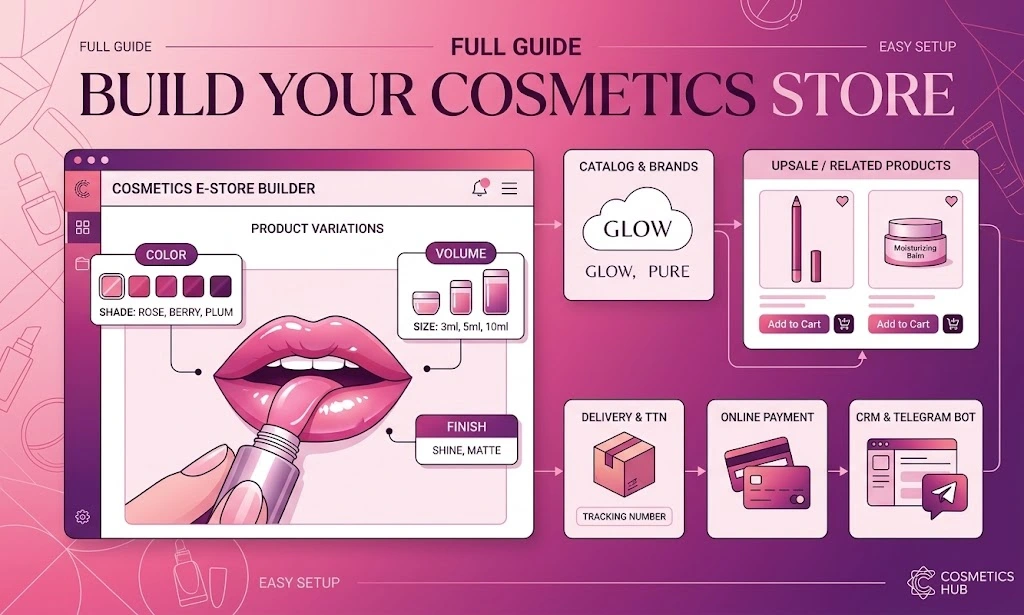
💄 How to Launch a Cosmetics Online Store: Full Guide
Cosmetics is one of the few niches where customers come back again and again, not once a year. That is why a cosmetics online store can grow through repeat purchases rather than advertising alone. In this guide we cover the launch from catalog structure to variants, synonym products, upsells, delivery with shipping labels, online payments, CRM and a Telegram shop — with clear examples and no fluff.
📄 Table of contents
- Why cosmetics is a profitable niche for an online store
- Assortment and catalog structure: categories, brands, attributes
- Variants: volume, shade and up to 4 groups per product
- Synonym products: a switcher by color and shade
- «Bought together» and upsell e-mail at checkout
- Telegram shop and e-mail marketing
- Delivery and creating shipping labels right from the seller panel
- Online payments, fiscalization and returns
- Built-in CRM and sales statistics
- Design and BooStore services: template, custom build, promotion
- SEO, ads and marketplaces: how to promote the store
- Common mistakes when launching a cosmetics store
- Useful links and step-by-step guides
🎯 1. Why cosmetics is a profitable niche for an online store
Before you draw a logo and buy a domain, answer honestly: why cosmetics? The niche is good because it combines two things that rarely go together — high margins and frequent repeat purchases. Foundation, shampoo, mascara or eye patches eventually run out, and the customer comes back. So the store lives not only on new traffic.
Analysts estimate the global beauty and personal-care market at hundreds of billions of dollars, growing steadily by a few percent a year. The category is considered one of the most resilient: even in a crisis people do not give up care and small joys such as a new lipstick shade — the effect marketers call the «lipstick index». The online share of cosmetics is growing faster than the retail average because the product is visual, light and easy to order «to try».
Cosmetics also has its own difficulties that beginners discover after launch: many variants of one product (volumes, shades, sets), the need to show the ingredients and expiry date, and strong competition for visuals. That is exactly why it matters that the platform handles variants and product links well — more on that below.
📦 2. Assortment and catalog structure: categories, brands, attributes
Chaos in the catalog kills sales faster than a high price. A cosmetics customer arrives with a specific task: «care for dry skin», «sulfate-free shampoo», «long-lasting lipstick». The catalog's job is to help them find it in 2–3 clicks. Start with a well-thought-out category tree, not with uploading the first batch of products.
🗂 How to build the structure
🗂 Main sections
Face care, body care, hair, makeup, fragrance, men's line, kids' cosmetics, professional cosmetics. Inside each — subcategories by product type (creams, serums, toners).
🏷️ Brands and manufacturers
A separate «Brands» section is one of the most visited in cosmetics. People look for a specific brand, so it should be a full entity with a filter, not text in a description. How it works — in the manufacturers guide.
🎁 Collections and sets
Sets like «face care», «gift set», seasonal collections. Collections are an extra selling scenario and a reason to send a campaign. Setup — in the store categories guide.
🔍 Attributes and filter
Skin type, purpose, active ingredients, volume, country, gender, age group. They build the search filter — the main selection tool in cosmetics.
Also plan the content that sells trust: ingredients (INCI), expiry date, storage conditions, certificates, availability of testers. In cosmetics there are fewer returns where it is honestly stated «suitable for sensitive skin» and the real bottle volume is shown.
⚙️ Catalog automation
Entering hundreds of items by hand is a sure way to abandon the project halfway. The catalog can be filled and updated automatically, without manual work:
- Import from any source: CSV, XLS/XLSX, XML, YML, Google Sheets, ZIP, from the clipboard, as well as loading via FTP/HTTP/HTTPS.
- Scheduled auto-import: up to 30 sources, a full load once a day and a catalog update every 4 hours.
- Accounting sync: exports from 1C/BAS — prices and stock are pulled in automatically.
The supplier changed prices or stock — your store updated itself without your involvement.
💰 Automatic markup: a sequential expression
Markup is set not by a single action but by a sequential mathematical expression: margin, costs and commission can be combined into one calculation, and the system executes it step by step, in order.
+10% + 20 + 2%
- Step 1. The price grows by 10%.
- Step 2. A fixed 20 is added (packaging, handling).
- Step 3. Another +2% is added (payment-gateway fee).
The operators +, −, ×, ÷ and percentages are supported — from the supplier's purchase price you instantly get your retail price.
🧬 3. Variants: volume, shade and up to 4 groups per product Key
This is where cosmetics differs from most niches. One product almost always exists in several variants: a cream in 30 and 50 ml, a lipstick in dozens of shades, a shampoo in 250 and 500 ml, and sometimes in different formulas too. Creating each variant as a separate card leads to hundreds of nearly identical products where both the customer and the search engine get lost.
BooStore solves this with variants — several versions of one product on a single card. The key difference from a «simple» product: each variant lives its own life. It has its own price, stock, SKU, image and description, and you can block the purchase of a specific variant if it is sold out or discontinued. To the customer all of it is shown as one product.
🎛 Up to 4 variant groups on one card
What is especially valuable for cosmetics is that variants can be grouped. A single product allows up to four groups of variants at once — and all of them open on one card, so the customer chooses everything in one place without jumping between pages. For example:
Group 1 — Volume
30 ml · 50 ml · 100 ml. Each volume has its own price and stock.
Group 2 — Shade / Color
01 Ivory · 02 Beige · 03 Tan. Swatches and images for each tone.
Group 3 — Type / Texture
Dry skin · oily · combination, or matte / glowing texture.
Group 4 — Kit / Material
Bottle · set with a pump · gift packaging, brush or sponge included.
When you enable several groups, the customer simply marks the needed volume, shade and type in turn — and the price, SKU and availability recalculate automatically without reloading the page. For masks, sets and skincare this saves dozens of separate cards.
⚙️ How to set up attributes and variants
🎨 4. Synonym products: a switcher by color and shade
Variants are great for the task «one product — many volumes». But what if you have dozens of shades of lipstick, nail polish or foundation, each essentially a separate product with its own photo, description and stock? Keeping them as variants can be inconvenient: swatches on one card visually «merge» and the customer loses their reference point.
For that case BooStore has synonym products. It is a mechanism that shows a switcher to similar products on the card — for example, to the same product in another color or shade. It looks like a row of icons or image links: hover over the red shade — you go to the card of the same product in red, and so on.
🔗 How it works
- You create separate cards for each shade (or color).
- In the «Variants» tab you find the «Synonym products» field and set the same label value for all «related» products — for example,
lipstick-matte-01. - After that a switcher between these products appears on the card, with images and links.
You get two levels of convenience: first the customer chooses a shade via synonyms, and then within a specific shade — the variants (for example, a 3.5 ml volume or a gift set). It is both more convenient and visually clearer than dumping all colors into one long strip.
On mobile the mockup stacks into one column: the photo on top, then the shade switcher and volumes below. This way the customer moves between shades of the same product without leaving the store.
🛒 5. «Bought together» and upsell e-mail at checkout Bonus
The cheapest way to raise revenue is not to attract a new customer but to increase the average order of the one who already came. Cosmetics is perfect for this: a cream calls for a toner, mascara for a pencil, shampoo for a conditioner, lipstick for a gloss. BooStore has two upsell tools at once.
📦 Related products («bought together»)
On the product card you can list related items. They appear in a recommendation block next to the description and work on the «carrot» principle: the customer sees a logical addition at the moment they are already set to buy.
✉️ A separate product list for an e-mail sent at checkout
This is a subtler mechanic that is often underestimated. For each product you can set a separate list of items that is sent to the customer by e-mail in addition to the order confirmation. So someone bought a skincare set and a minute later gets an e-mail «customers often add samples, patches and SPF to this set». It is not an intrusive banner but a personal selection in the inbox that they will definitely open.
Cream/serum →
Toner, essence, massage attachment, SPF.
Shampoo →
Conditioner, mask, leave-in care, comb.
Makeup →
Primer, brush/sponge, micellar water, makeup remover.
Fragrance →
Travel miniature, sample set, candle, cosmetic bag.
🤖 6. Telegram shop and e-mail marketing
You got a customer, they placed an order — now you need to retain them. Retention is many times cheaper than acquisition, and BooStore has two built-in channels for it: e-mail and Telegram. Both work from one admin panel, without third-party services.
📧 E-mail marketing inside the platform
- E-mail base: auto-collection at checkout, CSV/XLS import, subscribe and unsubscribe.
- Your own e-mail templates for each event: order confirmation, «bought together» e-mail, review request, abandoned-cart e-mail.
- Reminders about an unfinished purchase at different intervals (1–20 days) — a direct return of revenue.
- Back-in-stock notification — for sold-out shades it is a separate stream of orders.
You manage the base and templates in the sections «E-mail base» and «E-mail templates» in the store admin panel.
💬 Telegram shop: a storefront, campaigns and search in one messenger
If e-mail is a «letter to an inbox» that many open rarely, Telegram is a messenger people check every day. That is why a Telegram shop often beats e-mail in reach and trust. And it is not just a broadcast channel but a full storefront:
- A category tree with subcategories right in the bot — the customer browses the catalog without leaving Telegram.
- Product cards: title, price and old price, image, variants (volume, shade), link to the product.
- Search by title, SKU and meta fields — like on the site.
- Paged output with quick buttons «+5» and «To the end» — no endless scrolling.
- Product and promo campaigns: «New arrivals», «Sale», «Bestsellers» — with scheduling and audience selection.
- Order and delivery notifications to the customer right in Telegram — via the same e-mail as their subscription.
For a cosmetics store this is especially convenient: a subscriber gets a new-collection announcement right in the messenger, opens the card immediately, chooses a shade and places an order. No «follow the link to the site and find it yourself».
🚚 7. Delivery and creating shipping labels right from the seller panel
Cosmetics is compact but delicate: bottles break, aerosols and polishes have shipping restrictions, and volume and weight affect the cost. So it is better to set up delivery before the first orders, not after. On BooStore carriers connect in a couple of clicks via API. For international and cross-border shipping the key one is GoShippo — a multi-carrier service covering DHL, UPS, FedEx, USPS and others, with rate calculation and label creation.
🧾 What the integration gives you
- Auto-suggestions of cities, branches and streets at checkout;
- Automatic delivery-cost calculation based on dimensions and weight — you set them on the product card;
- Flexible configuration of order-form fields for each delivery method;
- Automatic status updates by tracking number (manually, in bulk or on a schedule).
🏬 Pickup points and store pickup: if you have your own shop or warehouse
For cosmetics this is a special value: customers want to touch, see a shade live and assess the packaging. BooStore has pickup points — you add your addresses and the customer chooses a convenient point right at checkout.
Most importantly, you control the delivery cost for such cases: store pickup can be free, or you can set separate conditions by price, volume or weight. For example, courier is paid while pickup from your showroom is 0. More on the delivery services page.
💰 Your own delivery math: fixed fee, percentage or both
If you partly cover the costs, the delivery price does not have to be «just like the carrier» — you can assemble it by your own rule. Available are a fixed price, dependence on order total, volume (m³) or weight (kg), as well as a combination: fixed fee + percentage. The same sequential calculation principle works here as with markup: your costs (packaging, handling, carrier fee) are added to the real carrier cost, producing the final price for the customer. Or you can leave delivery out of the order entirely and put it on the recipient (cash on delivery).
On BooStore the set of order-form fields is configured for each delivery method, and the cost is inserted automatically — the customer sees only the fields they need.
📋 Shipping labels are created automatically and right from the seller panel
The preferred way is to create the shipping label right in the admin panel while editing an order. You specify the delivery parameters, payment method, who pays, dimensions and weight — and the system creates the label in the carrier's account. Fast label printing is available right on the site. This is effectively full delivery management without leaving the site: no need to separately log into the carrier's panel and copy the order data.
If the delivery method supports it, the platform can also create labels automatically on order, and statuses are pulled in by the tracking number on their own — manually, in bulk for all orders, or on a schedule without your involvement. The customer then gets an e-mail and, if subscribed, a Telegram notification: «In transit», «Arrived at the branch», «Delivered».
💳 8. Online payments, fiscalization and returns Important
The easier it is to pay, the higher the order conversion. In cosmetics, where purchases are often impulsive, the ability to pay by card in one click almost always beats «I'll transfer to a card manually». BooStore supports the main set of payment systems: Stripe, PayPal, MonoPay (Monobank), LiqPay / Privat24, WayForPay, Fondy, Hutko, iPay — with card payments, Apple Pay and Google Pay.
🧩 What matters for a cosmetics store
🔎 Payment after review
You can disable online payment until a manager confirms the order — handy when stock for shades needs a double-check.
🔗 Payment by link
Generate a payment link and send it in a messenger or by phone — the invoice generator builds it in seconds. Such a link lets you not only take payment but also assemble the cart in one action — handy if the order came via a messenger: you update the items and place it as a product order.
🕓 Hold and installments
Two-stage payment (funds hold with confirmation) and pay-in-parts — relevant for premium cosmetics and fragrance.
🧾 Fiscalization
Passing the order composition for fiscalization works with LiqPay, PrivatBank, WayForPay, Monobank, Hutko and iPay — legally and without a manual register.
Returns are also inside the platform: a payment can be refunded right from the sales statistics, with a refund response from the payment system. For cosmetics this matters — a personal-care product often cannot be returned once opened, so the return policy is best stated openly.
🗄️ 9. Built-in CRM and sales statistics
Selling cosmetics «by eye», without records, is a fast track to order chaos and losses. BooStore has a built-in CRM that covers the store's basic needs without third-party services or fees.
📊 Sales statistics
Order status funnel, payment and delivery statuses, sales analytics, operators and conversions. All orders in one place.
👤 Customer base
Purchase history, contacts, groups with discounts, cashback balance, newsletter subscription. Auto-registration at checkout — optional.
📦 Order management
Statuses, shipping labels, tracking number, editing the order composition, sending the «bought together» e-mail, review requests.
💬 CRM in Telegram
New-order notifications and status changes via a Telegram bot — the manager runs the store right from their phone.
I will separately highlight variant analytics: if you have many volumes and shades, statistics show what sells better and what is stuck. It is a direct hint on which shades to restock and which to retire. For a cosmetics store this is more valuable than the overall «sales for the month».
🔐 Flexible access rights: orders and store management
When a store has several managers, it is important to split responsibilities. On the platform you can grant access only to order processing — without the right to touch settings, prices or content. You can also prevent one manager from editing another manager's order: each sees and processes only their own orders.
When the order items change, delivery and the total are recalculated automatically — a manager cannot manually «tweak» the price or break the calculation order.
Rights are configured not only for orders but also for working with site content: one employee is responsible only for products, another — for pages, articles or categories. That is full flexibility in splitting management — both in orders and when updating site data.
🎨 10. Design and BooStore services: template, custom build or turnkey promotion
The look of a cosmetics store sells no less than the price. But there is an important caveat: do not chase flashy «colorful» websites. Online-store practice shows that light, white sites sell better — the product reads well, shades look natural, and the interface does not compete with the product for attention. Cosmetics is bright by itself, so the background is better kept calm white or light gray.
The good news: in most cases a separate designer is not needed. BooStore has a catalog of ready templates and a block library — they are enough to assemble a tidy storefront for your niche in one evening. Design is finely tuned to the task, but without overload.
🖼 Ready template
The fastest path. Pick a template, replace the logo and images — the store is ready. Suits most startups.
🧩 Block library
Ready responsive sections (headlines, benefits, icons) — build the homepage like a constructor, no code.
🛠 Custom build
If you need a unique layout — use the platform's HTML/CSS editor or order a custom build from the BooStore team.
🤖 AI-assisted design
Describe the desired style in text — the platform generates HTML/CSS that you can apply to the site right away.
🔍 11. SEO, ads and marketplaces: how to promote the store
Cosmetics is a huge search demand: «buy wrinkle cream», «shampoo for colored hair», «nude lipstick». For this traffic to come for free, the store needs a technical foundation. BooStore is built for SEO from the start: transliterated URLs, Smart Meta, auto-generated sitemap.xml, editable robots.txt, 301 redirects, JSON-Schema for products and strong Core Web Vitals.
📢 How to promote a cosmetics store
Promotion is best built in two layers. First — free organic traffic: SEO, blog articles, card optimization. The basics are covered in the guide «How to improve website SEO». The second layer is paid traffic: once the technical base is in order, turn on ads via Google Ads and Performance Max. Then the budget is not wasted but brings in customers ready to pay.
🚀 Promotion tools and steps
- Schema.org markup for products and reviews — rich snippets with price and stars in Google.
- Basic SEO optimization — meta tags, structure, internal linking.
- Free Google Shopping product listings — a storefront in search with no budget.
- Google Ads and Performance Max — when you need paid traffic.
- Export to marketplaces — if you also want to sell on platforms from the same catalog.
For a store with variants, make sure the export is correct: each volume and shade must go as a separate item with the right SKU. Then ads and Google Shopping show exactly what is in stock, and money is not spent on sold-out shades.
❌ 12. Common mistakes when launching a cosmetics store
Most mistakes are made before the first sale and are expensive to fix later. Check yourself against the table below.
| Mistake | Why it hurts | How to fix it |
|---|---|---|
| Each shade as a separate card with no links | The catalog bloats, the customer gets lost, SEO scatters | Variants + synonym products |
| The same SKU for different variants | Products «glue together» on import and export | A unique SKU per variant |
| No ingredients, volume or expiry date | Mistrust and returns | Fill in attributes and descriptions |
| Only bank-transfer payment | Some customers leave without ordering | Enable online payment and Apple/Google Pay |
| No subscriber collection or campaigns | The customer buys once and forgets the brand | E-mail base and a Telegram shop with upsells |
| Labels created manually in the carrier panel | Time loss, data errors | Create labels right from the seller panel |
🔗 13. Useful links and step-by-step guides
We gathered everything you will need to launch a cosmetics store in one place. Move step by step and do not try to do it all in one evening.
Step-by-step store creation and building a store in 9 steps.
Delivery, ways to accept money, payment systems and invoices.
Website SEO, Google Ads and Performance Max, growth after launch, launch checklist.
Full guides: sneaker store and grocery store — cosmetics follows the same logic.
All platform capabilities — in the article «Full BooStore SaaS functionality».
Do not want to do it yourself — order BooStore services: design, build, SEO and article writing (no limit on the number). For catalogs with hundreds of thousands of products — the Enterprise plan.