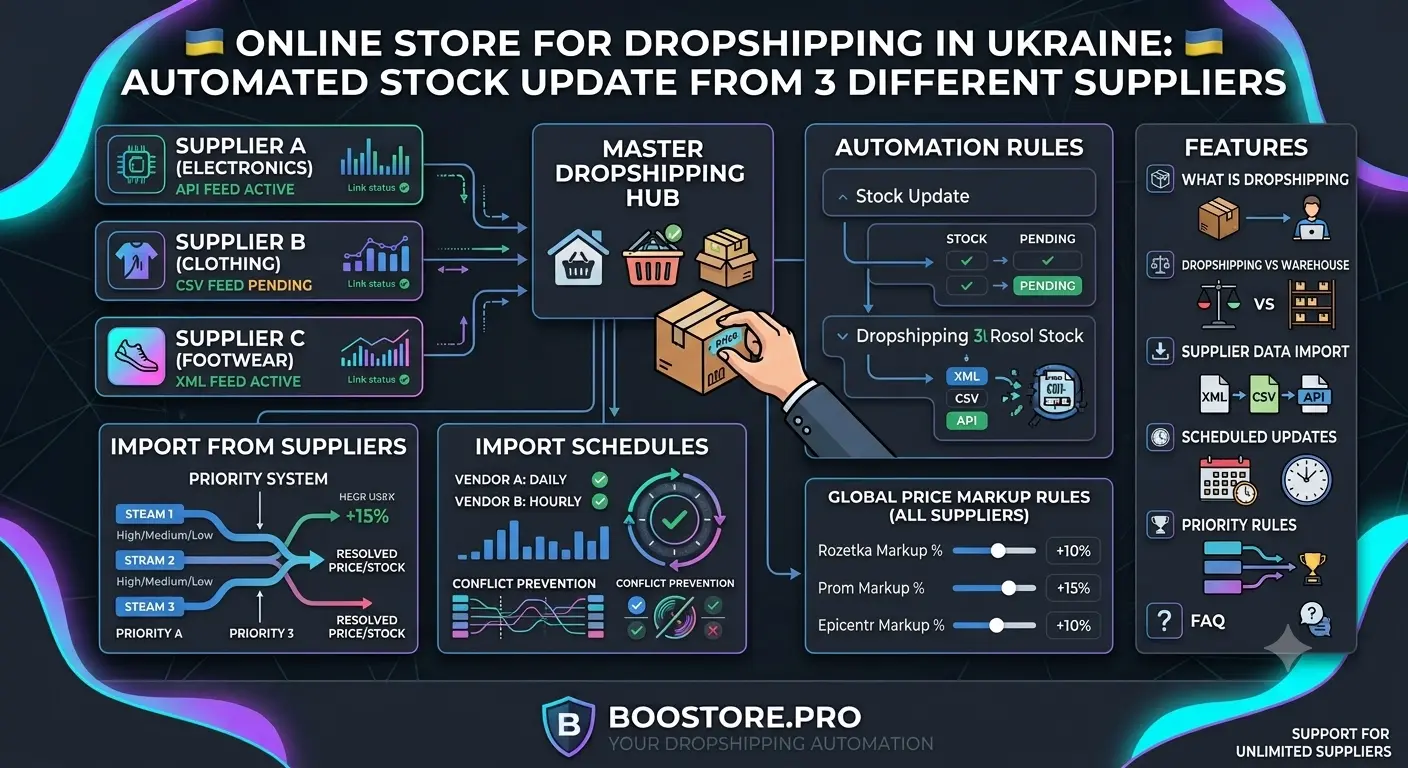
Online store for dropshipping in Ukraine: automating stock updates from 3 different suppliers
Dropshipping is one of the most popular e-commerce models in Ukraine. But manually managing products from multiple suppliers turns into a nightmare: prices become outdated, products are sold at a loss, and customers complain about out-of-stock items. In this article, we'll explore how BooStore solves these problems with automatic import and data updates from an unlimited number of suppliers.
📄 Table of Contents
- How dropshipping works in Ukraine
- Dropshipping vs classic warehouse: model comparison
- What data sources BooStore supports
- Automatic product import from multiple suppliers
- Flexible import schedules: from 4 hours to 28 days
- Multiple import sources and the order they run in
- Markup: how the price is recalculated
- Stock status management
- Why BooStore is the ideal solution for dropshipping
- Adding a supplier source step by step
- Commerce API and AI: description generation
- Frequently Asked Questions
How dropshipping works in Ukraine
Dropshipping is a retail model where the store does not keep products in its own warehouse. When a customer places an order, the store forwards it to the supplier, who ships the product directly to the customer. The store earns the difference between the retail price and the supplier's price.
In Ukraine, dropshipping is especially popular thanks to a developed network of logistics operators — Nova Poshta, Ukrposhta, Justin. Entrepreneurs can launch an online store without investing in inventory, warehouse rental, or the risk of illiquid stock.
The solution is full automation of import and data updates from all suppliers. Automated online store that works for you — a detailed overview of automation principles on BooStore.
Dropshipping vs classic warehouse: model comparison
The choice of model depends on your goals, budget and niche. Below is a comparison by key parameters.
| Parameter | Dropshipping | Warehouse (Stock-based) |
|---|---|---|
| Starting capital | Minimal | High (product purchase) |
| Risk of illiquid stock | None | High |
| Warehouse rental | Not needed | Required |
| Packaging quality control | Limited | Full |
| Margin | Lower (10-30%) | Higher (30-100%+) |
| Time to launch | 1-3 days | 2-4 weeks |
| Order fulfillment speed | 1-5 days (from supplier) | Ship same day |
| Returns handling | Through supplier | You manage yourself |
| Stock updates | Manual — hellish work | Automatic (write-off) |
| Automation on BooStore | Full: import + markup + multiple sources | Full: warehouse & procurement management |
Dropshipping is ideal for starting and testing niches. Classic warehouse — for scaling and margin growth. In any case, BooStore supports both models. Create a free store and try both models in action.
What data sources BooStore supports
BooStore can import products from any popular format. This means you can connect any supplier who provides data in one of the following formats:
📄 CSV
The most common format from Ukrainian suppliers. Supported delimiters: comma, semicolon, tab. Automatic column detection and field mapping.
📑 XLS / XLSX
Microsoft Excel files with any number of sheets. Import all sheets or selectively. Cell formatting support.
📋 XML
Structured data from large suppliers and distributors. Supports custom XML schemas with XPath configuration for data extraction.
📊 Google Sheets
Import directly from Google Sheets. Supplier updates the sheet — your store gets new data. Read separately: mass price update from Google Sheets.
Automatic product import from multiple suppliers
BooStore loads products into your store's database on a schedule. Each source can run in its own mode, and the system:
- Loads new products — full import: if a product with this SKU does not yet exist, it is created together with its description, attributes and images;
- Updates existing ones — a separate "update only" mode: changes prices, stock and other fields without adding new items and without re-downloading images (fast and easy on the server);
- Hides missing ones — if a product disappears from the supplier's price list, its stock can be zeroed and the status set to "out of stock";
- Calculates the retail price — applies your markup (percentage or fixed amount) to the supplier's price;
- Converts currency — the currency is detected from the price list and converted to the store's main currency at the current rate;
- Downloads images — fetches photos from links in the price list, converts them to WebP if needed and attaches them to the product.
Each source is configured separately: its own file or link, its own schedule, its own markup and its own categories. For example, electronics can be updated every 4 hours from one supplier, while clothing can be updated once a day from another. All BooStore automation tools.
Flexible import schedules: from 4 hours to 28 days
For each supplier source, you can set an individual update schedule. The interval setting depends on how often the supplier updates data:
| Interval | When to use | Recommendation |
|---|---|---|
| Every 4 hours | Supplier updates prices and stock several times a day | Large electronics distributors, building materials |
| Every 8 hours | Supplier updates price list once a day | Typical scheme for most suppliers |
| Every 24 hours | Daily update is sufficient | Slow-moving products, clothing, books |
| Every 7 days | Price list updated once a week | Suppliers with fixed catalog |
| Every 14 days | Stable prices, rare changes | Handmade products, premium segment |
| Every 28 days | Maximum rare updates | Digital products, services, subscriptions |
You can also set the exact time for import execution. For example, to run the import at 3:00 AM when server load is minimal. Or right after the supplier typically publishes a fresh price list.
Multiple import sources and the order they run in
BooStore does not limit the number of import sources: you can have 3, 10 or 50 suppliers — each with its own price list, schedule and markup. It is important to understand how the system works with several price lists at once:
- Each source is a separate price list. The system processes sources one after another. Products are matched by SKU: if an item appears in several price lists, the store ends up with the data from the source processed later.
- Priority sets the processing order. The "Priority" field (from 10 to 0) determines the order in which sources are run. It is not a choice of "whose price is better" but the queue: a source with a higher value is processed earlier, a lower one — later.
- A source can be limited to categories. In the settings there is a filter "Specify categories for import": you list category IDs, and products from other categories are not imported. This is a convenient way to assign different categories to different suppliers.
Additionally, each source has its own mode: "Load new products" (full import that adds items and downloads images) or "Update" (prices and stock only). This keeps the assortment fresh without unnecessary server load.
Markup: how the price is recalculated
For each source you can enable a markup. A markup is a single simple operation on the price list value: add, subtract, multiply or divide. You can also mark the value as a percentage.
Configuration examples
| Setting | What it does | Result (supplier price 1000 UAH) |
|---|---|---|
* 1.25 | Multiply — 25% markup | 1250 UAH |
+ 150 | Add a fixed 150 UAH | 1150 UAH |
- 5% | 5% discount off the price | 950 UAH |
/ 0.85 | Reverse calculation for the required margin | 1176 UAH |
The operators +, -, *, / and the percent sign % are supported. A markup can be set separately for the retail price, old price and purchase price. You can also include a separate "markup" column in the price list — then the value comes from the supplier's file.
Stock status management
BooStore supports three stock statuses for each product. The status can be set by the supplier in the price list or calculated automatically based on data.
| Status | Description | Displayed in store | Action on import |
|---|---|---|---|
| In stock | Product is in supplier's warehouse, ready for shipment | Yes, available for order | Product active, shown with "Buy" button |
| Out of stock | Product temporarily unavailable from supplier | Hidden or "Out of stock" | Product hidden or shown with unavailability note |
| Available for order | Product can be ordered, but delivery time is extended | Yes, with "Available for order" note | Product active, shows waiting time |
Status configuration allows:
- Automatically hide products that are unavailable from the supplier to avoid unfulfillable orders;
- Keep products "available for order" — if the customer is willing to wait, you don't lose the sale;
- Automatically change a product's status when its stock reaches zero — after an order is placed or a price list is updated (see the stock deduction section below).
The stock status can be specified in the supplier's price list column (e.g., "Availability" column with values "yes"/"no"/"on order"), or calculated by quantity: if quantity > 0 — "in stock", if = 0 — "out of stock", you can set a threshold value for the "available for order" status.
Why BooStore is the ideal solution for dropshipping
Dropshipping wins through up-to-date data: the customer should see only what the supplier really has, and at the right price. BooStore handles both tasks automatically:
- Always a fresh assortment. Import and update run on a schedule, so the catalog is constantly synchronized with supplier price lists: new items appear, withdrawn ones disappear, prices and stock update without your involvement.
- Stock is deducted immediately on order. Store settings include an option to deduct stock when an order is placed. If enabled, the product quantity decreases at the moment of purchase, and once it reaches zero the product automatically becomes "out of stock", "available for order" or hidden — your choice. This protects against overselling when an item is already sold out but still shown as available.
- Always the right price. Markup and currency conversion are applied on every import, so the retail price never gets stuck on an outdated value.
As a result, the store runs on autopilot, showing customers current products and never selling what is not available. Create a dropshipping store for free and see for yourself. A full overview of all automation tools is available on the Store Automation page.
Adding a supplier source step by step
Let's look at how to add a new supplier in BooStore and configure automatic import of their products.
Go to the "Suppliers" section
In the BooStore admin panel, open "Store" → "Suppliers". Click the "Add supplier" button. Enter a name (e.g., "Supplier A — electronics").
Specify the source type and upload the file
Select file type: CSV, XLS/XLSX, XML or provide a link to Google Sheets. Upload the price list file or paste a URL. The system will analyze the data structure.
Configure field mapping
Specify which column in the file corresponds to product name, price, SKU, description, image, stock. BooStore will try to determine columns automatically. Check and adjust mapping manually if needed.
Set the markup
Enable a markup for the retail price, old price (for promotions) and purchase price. For example: the "multiply" operation with the value 1.3 for a 30% markup. More about updating prices from Google Sheets.
Configure import schedule
Select the interval: every 4 hours, 8 hours, 24 hours, 7 days, 14 days or 28 days. Specify the exact start time if needed. For the first time, run the import manually using the "Start import" button.
Set the run order and categories of the source
Specify the priority — the queue in which sources are run (from 10 to 0). If needed, limit the source to categories so that this supplier's price list updates only certain products. Save the settings — the supplier is added.
Check import results
After the first import completes, check the products in the catalog. Make sure prices are calculated correctly, images are loaded, stock statuses match expectations. If needed, edit mapping settings or formulas.
Repeat these steps for each supplier. The system will automatically update data on the set schedule, allowing you to focus on marketing and sales. Learn more about store automation.
Commerce API and AI: generating unique descriptions and managing data
Beyond the built-in import, BooStore provides CommerceAPI v2.0 — a full-featured API for programmatic management of your catalog, orders, and product data. This opens up deep automation capabilities beyond standard imports.
🤖 AI-powered description generation
Via the API, you can automatically create unique SEO product descriptions using AI. Pass product attributes (name, brand, parameters) and get a ready-made description optimized for search queries. This makes content unique even when a supplier provides identical descriptions for thousands of products.
🔄 Bulk updates via API
Create, update and manage products programmatically: prices, stock, SKU, attributes, variations and images — all through the API. Perfect for syncing with external CRM, ERP systems and 1C. Ready-made script on GitHub.
- Automatic description generation — create templates where content is inserted automatically based on product parameters (material, type, properties);
- Two-way synchronization — import data from suppliers and automatically send orders back to CRM/ERP via Webhook;
- API management — categories, collections, manufacturers, payment statuses and transactions — all available programmatically.
Frequently Asked Questions about dropshipping automation
How many suppliers can I connect to BooStore?
The number of suppliers is unlimited. You can add any number of import sources — whether 3 or 100. Each is configured with its own file/link, schedule, calculation formulas and priority.
How do I combine several suppliers in one store?
Add each price list as a separate import source. For each one, set its own file or link, schedule and markup. So that one price list does not overwrite the products of another, separate suppliers by categories using the "Specify categories for import" filter, or set the run priority — the order in which sources are processed.
How often should I update supplier price lists?
We recommend setting the import interval depending on supplier dynamics: for electronics and products with frequent price changes — every 4-8 hours; for clothing and slow-moving products — every 24 hours; for stable catalogs — every 7-14 days. If a product sells at an outdated price — you operate at a loss.
Can I import only certain product categories from a supplier?
Yes, in the source settings you can set filters by category, price, name or any other fields. For example, import only products from the "Smartphones" category or only products with a supplier price from 500 UAH. This allows connecting one supplier for different niches.
Does BooStore support image import from suppliers?
Yes, images are imported automatically. In field mapping, specify the column with image links. BooStore will download images to its server, convert them to WebP if needed and attach them to products. Multiple images per product are supported — just specify the column with links separated by semicolons or commas. More about content automation.
Is the in-stock quantity updated when an order is placed?
Yes. Store settings include an option to deduct stock when an order is placed. If enabled, the product quantity decreases immediately at purchase, and once it reaches zero the product automatically becomes "out of stock", "available for order" or hidden — according to the scenario you choose. This helps avoid selling the same item twice when it is already sold out.
What is the difference between importing new products and updating?
These are two source modes. "Load new products" is a full import: it adds items, descriptions, attributes and photos. "Update" is a fast mode for existing products only: it changes prices and stock without adding new items or re-downloading images.
What if the supplier changes the price list structure?
In this case, you need to update field mapping in the source settings. Go to "Suppliers" → select the required one → "Settings" → "Field mapping". Fix column mapping and run a test import. Old products will not be deleted, only the data structure will be updated.