Telegram Sales Automation: collect subscribers, send messages, products and promotional offers
Telegram is one of the "hottest" sales channels: your customers are there, order notifications arrive there, and it is exactly where it is easy to turn subscribers into buyers. BooStore makes Telegram sales automation built-in: you collect a subscriber base through a bot, then send them messages, products and promotional offers — right from your store admin panel.
📄 Table of contents
Why automate sales in Telegram
A customer who has written to you on Telegram or subscribed to your bot is already a "warm" contact. They know about you, they are interested, and they are two clicks away from a purchase. If you do not stay in touch, the customer forgets about the store and leaves for competitors. Automation solves this:
- Constant contact with your audience — bot subscribers are always with you: new products, promotions and news reach them instantly.
- Repeat sales — it is cheaper and easier to sell to an existing subscriber than to find a new customer.
- Instant delivery — unlike e-mail, a Telegram message arrives in seconds and has high open rates.
- Time savings — set up the newsletter once, and the system does everything automatically: on a schedule, with ready-made product selections.
How it works: from bot to subscriber
The scheme is simple and clear to any store owner. You do not need to be a programmer:
- Create a bot via @BotFather and get an API token.
- Connect the bot to the store — in the newsletter section of BooStore you add a channel/bot and paste the token. The system verifies the token and sets up the webhook.
- Customers subscribe — a user launches the bot with the /start command and automatically joins your store's subscriber base.
- You send a newsletter — create a message (text, products, offers, an article) and send it to all or selected subscribers.
Everything is managed in the store admin panel. No third-party services or manual bot work.
What BooStore gives you: a full set of newsletter features
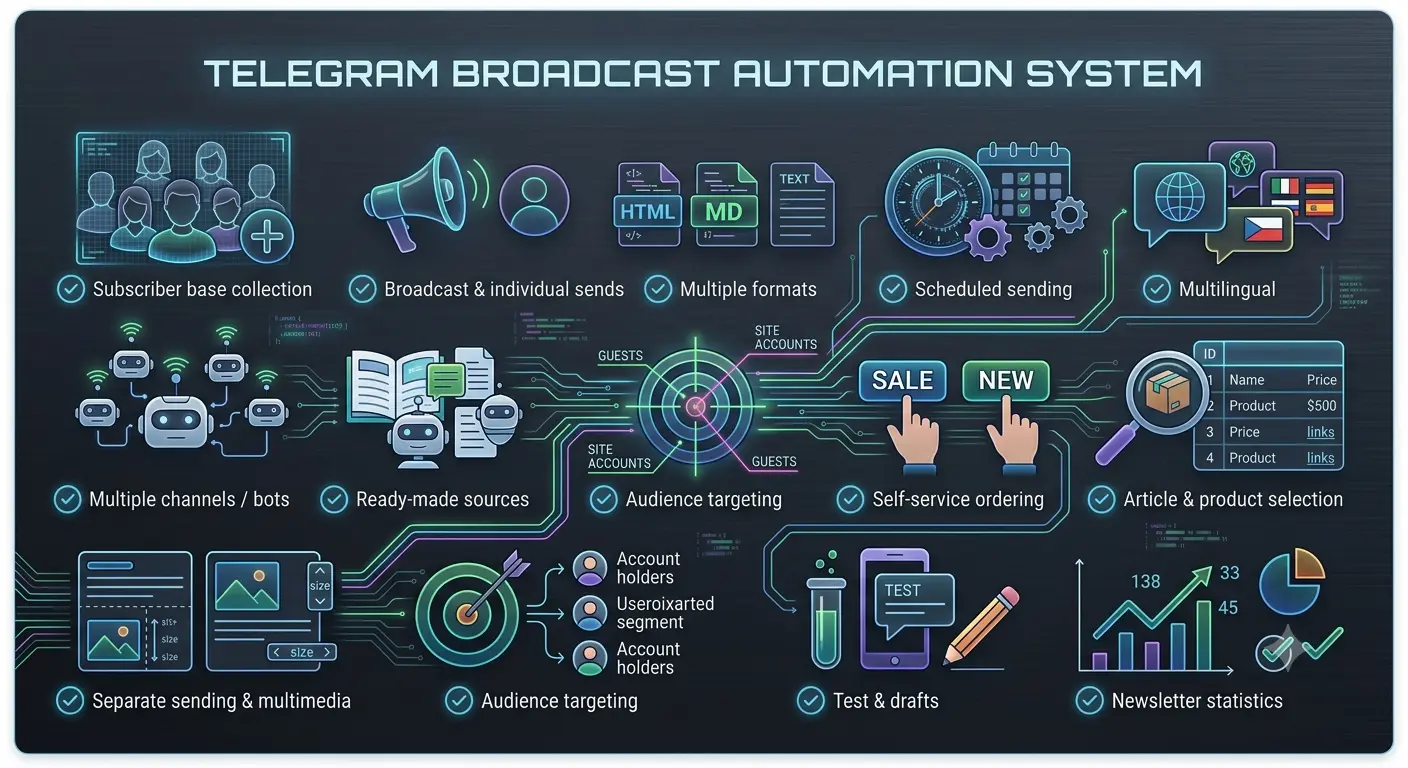
BooStore has a built-in, full-featured messenger newsletter system for a Telegram channel or bot. It covers all sales automation scenarios:
👥 Collecting a subscriber base
Users automatically join the base when the bot starts (/start) — with their language and profile. The base is managed in the admin panel.
📨 Send to all or selected
Send a message to all subscribers or only to manually selected ones (individual send), with audience settings: all, only with an account, or guests.
⏰ Scheduled sends
Schedule a newsletter for a specific date and time — the system sends it automatically. Convenient for promotions and announcements.
🌍 Multilingual
Text in many languages; each subscriber receives the version in their messenger language, or the default language if there is none.
📝 Message formats
HTML, Markdown or plain text — choose for the task. It also works with long texts, splitting them into messages.
📦 Ready-made content sources
Create a newsletter from articles, promotional offers (sale, new arrivals, bestsellers, discounts) or from products you select by ID.
🖼️ Images and sizes
Add an image and a list of sizes/variants to each product — the product card in the message looks complete.
🤖 Self-service ordering by subscriber
A subscriber can request sale, new arrivals or the latest arrivals themselves via bot buttons — without your involvement.
📊 Newsletter statistics
All data about each newsletter — status, sent, errors, date — in one place.
⏰ Scheduled sends and schedule
Sales should not depend on your time on the site. With scheduled sending you prepare the newsletter in advance, and the system delivers it exactly on time:
⚡ Send now
Instant newsletter to all or selected subscribers right from the admin panel.
📅 By schedule
Set the date and time — the newsletter is sent automatically. Ideal for morning promotion announcements or evening news.
📝 Drafts
Save message drafts, review them and send later — without losing data.
✂️ Split into messages
Long text or a product list can be automatically split into several messages — easier for the subscriber to read.
Product, offer and article selections for sending
The main power of a Telegram newsletter is showing the subscriber exactly what will bring a sale. BooStore can automatically collect content from your store:
- Promotional offers — sales, new arrivals, bestsellers and discounted products. For each product — name, price, old price and link.
- Latest arrivals — show the last 20 added products in one message.
- Product selection by ID — build your own selection: enter the IDs of the products you need, and the system assembles them into a message with name, price, link, and optionally with sizes and images.
- Catalog articles — turn useful blog articles into a newsletter and lead subscribers to content.
- Price offers — "Our offers for today:" plus a list of selected products in the subscription.
👥 Collecting subscribers and managing the base
The subscriber base is your asset. BooStore helps you collect it and manage it conveniently:
🤖 Automatic collection
The client launches the bot — and is immediately in the base with language and profile. No manual entry.
🛠️ Admin management
View subscribers, filter by language and status, add and edit.
📤 Export and import
Export the base to CSV/ZIP or import your own — for example, when migrating from another platform.
🔔 Unsubscribe and linking
A subscriber can unsubscribe with a button, and if desired — link an e-mail and a site account.
All this works inside the BooStore admin panel — without a separate newsletter service and without extra fees per message.
📲 Auto-notifications about order & delivery — to customer's Telegram
Besides the managers' channel, the site owner can create a separate Telegram channel/bot for customers (per site). If a customer is subscribed and places an order with the same e-mail linked to the subscription, they get Telegram notifications:
- Order created — right after checkout (number, items, total, delivery);
- Delivery status changed — on every TTN update (timer or manual): “In transit”, “Arrived at branch”, “Received”, etc.;
Managers/admins get notifications in the common BooStore channel by default (if subscribed). The customer channel works in parallel — seller and customer see the same order in two streams.
Delivery: Nova Poshta, branch #12
Total: $104 · Payment: COD
TTN: 20450123456789
Branch #12, Kyiv — ready for pickup
Built into BooStore
The most important thing — all Telegram sales automation is already built into the platform. You do not need to buy a separate newsletter service, connect third-party CRM or write code. You just:
- Create a store on BooStore (there is a free plan).
- Connect a Telegram bot in the newsletter section.
- Collect subscribers and send newsletters of messages, products and offers.
BooStore can also notify you about orders in Telegram — managing the store becomes even more convenient. Learn more in the article "Order management in Telegram / CRM".
Does the customer get Telegram notifications about order and delivery?
Yes. If the customer is subscribed to your site's separate Telegram channel/bot and checks out with the same e-mail linked to the subscription, they receive order-created and every delivery-status update (TTN, auto by timer) in Telegram. Managers/admins get the same in the common BooStore channel if subscribed. Configure seller vs customer channels separately in notification settings.
❓ FAQ about Telegram sales automation
Answers to the most common questions about Telegram newsletters on BooStore.
Do I need a separate Telegram newsletter service?
No. The whole newsletter system is built into BooStore. You connect a bot, collect subscribers and send newsletters of messages, products and offers right from the admin panel — without third-party services and extra message fees.
How to collect subscribers into the Telegram bot?
Just give users the bot link. When a client launches the bot with the /start command, they automatically join your store's subscriber base — with language and profile. The link can be placed on the site, in social media and in order notifications.
Can I send newsletters on a schedule?
Yes. BooStore has scheduled sending: you set the date and time, and the newsletter is sent automatically. Convenient for promotion announcements, morning or evening messages — sales work without your involvement.
How to make a newsletter of promotions and new arrivals?
BooStore automatically collects promotional offers (sale, new arrivals, bestsellers, discounts) and the latest arrivals. For each product it creates a name, price, old price and link. You can also select specific products by ID or build a newsletter from articles.
Can I add product images and sizes to the newsletter?
Yes. In the product selection you can enable an image and a list of sizes/variants for each product. The message looks like a full product card — with name, price, link, picture and sizes.
How does a subscriber unsubscribe from the newsletter?
There is an "Unsubscribe" button (or command) in the bot. The subscriber can manage the subscription themselves. Their data remains in the base, and they can subscribe again if they want.
Is multilingual newsletter supported?
Yes, the newsletter is multilingual. You fill in the text in several languages, and each subscriber receives the version in their messenger language. If there is none — the default language is used.
Can I send the newsletter not to everyone, but to selected subscribers?
Yes. You can send the newsletter to all subscribers, only to subscribers with a linked account, only to guests, or manually select specific subscribers for an individual send of a specific newsletter.
Is the Telegram newsletter feature paid?
Sending newsletters is available for sites with paid hosting (from $3/month), which removes platform limits. On the free plan you can create a store, connect a bot and prepare a newsletter to test the functionality. More about the free plan.
Can I get offers from a subscriber without my actions?
Yes. A subscriber can request sale, new arrivals, bestsellers or the latest arrivals themselves via bot buttons. This increases engagement and lets the client get the right offers at a convenient time.
Can I have many subscribers in the order management bot?
Yes. The Telegram bot is designed for a large number of users: everyone who launches the bot with the /start command automatically joins your store's subscriber base — with language and profile. There are no limits on the number of subscribers, and you can send newsletters to everyone at once or to selected ones manually.
Can I delete subscribers in the Telegram bot?
Yes. The main administrator can fully manage the subscriber base from the store's admin panel: view the list, filter it and delete subscribers when needed. There you can also change the bot key (token) — for example, if you reissued it via @BotFather, simply enter the new key in the settings and the bot will keep working with the entire base.
Can waybills be printed via the Telegram bot?
Yes. If a TTN has been created for an order, printing of delivery service waybills is available via Telegram. Printing works through the delivery services' APIs connected on the site — the connection itself takes just a few clicks.