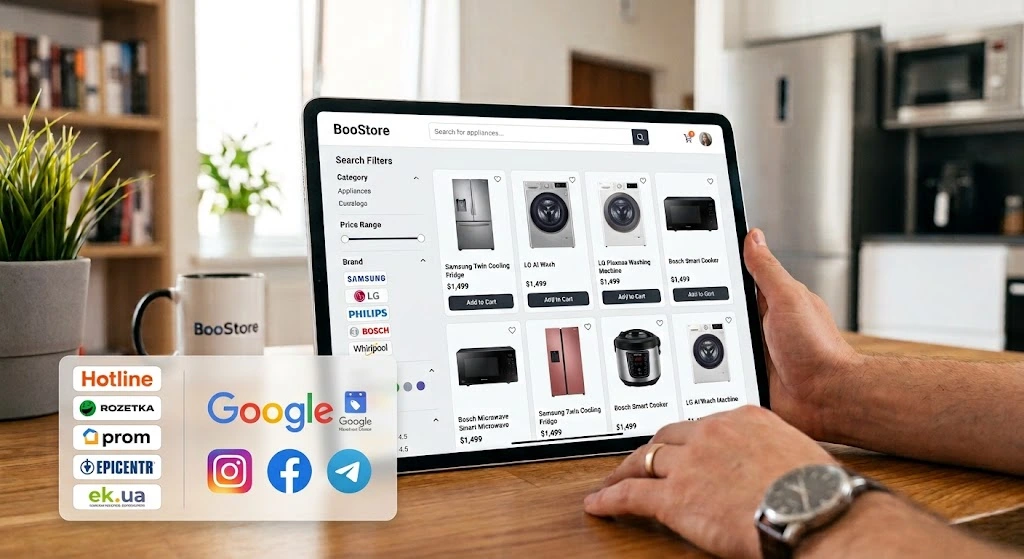
How to Open a Home Appliances Online Store: A Complete Guide
Home appliances is a niche with a high average order value, clear demand and a mandatory repeat cycle (filters, hoses, consumables, accessories). We will go step by step through launching an appliance store on BooStore: from smart filters for refrigerators, washing machines and microwaves to delivery with lifting, wholesale prices, cashback, a Telegram store and catalog exports to Hotline, Rozetka, Prom, Epicentr and ek.ua.
📄 Table of contents
- Potential profit and benefits of the home appliances niche
- Step-by-step store launch plan
- Template and design for an appliance store
- Catalog structure: categories, brands, collections
- Search filters: refrigerators, washing machines, microwaves
- Variants: color and configuration
- Adding products: manually or bulk import
- Automatic import and stock updates
- Wholesale prices by quantity and B2B
- Cashback, bonuses, promotions and newsletters
- Online payment, fees and formula-based calculation
- Delivery of large appliances, lifting and TTN
- Orders, built-in CRM and Telegram store
- SEO and free promotion
- Catalog export: Hotline, Rozetka, Prom, Epicentr, ek.ua
- API, Commerce API and integrations
- Sales statistics and analytics
- How to start for free
- Frequently asked questions
Potential profit and real benefits: why open a home appliances store Business
Home appliances is one of the most "mature" e-commerce niches: a high average order value, predictable demand and a huge choice of cross-sell products. Unlike impulse purchases, appliances are chosen deliberately — so the store where it is convenient to filter, compare and trust wins. That is where a good catalog wins: smart filters, specifications, configurations and honest information about delivery and warranty.
Situation 1: you already have an offline store or a sales point
You have a showroom, a warehouse and suppliers. A website on BooStore turns them into 24/7 sales: the catalog syncs with stock, orders arrive in Telegram and CRM, and marketplace exports bring in buyers who are looking for a specific model on Hotline or Rozetka. Even if half of the purchases continue in-store, the website becomes a showcase and a self-service sales tool.
Situation 2: dropshipping and made-to-order sales
The fast-moving range (microwaves, vacuum cleaners, kettles, small appliances) can be kept made-to-order with suppliers: connect up to 30 import sources with different markups and automatic stock updates — a warehouse is optional. Keep large appliances (refrigerators, washing machines) selectively: 2–3 brands, the hottest models, the rest on request from the supplier's price list.
Situation 3: starting from scratch in the niche
Start with 50–150 SKUs: microwaves, kettles, vacuum cleaners, small appliances — a low entry barrier for delivery and returns. Then add large appliances once you understand the audience. The website launches free of charge in a day: the Free plan is unlimited, up to 1000 products, no sales commissions.
The technical foundation is provided by the BooStore platform: variants (color and configuration), specifications and search filter, wholesale prices, cashback, TTN, Telegram store, API and exports. The full list of features is in the article "Full BooStore SaaS functionality", and how to build a store that runs without your constant involvement is covered in the guide "The automated store that works for you".
The technical part
Now to practice. Below are the specific steps and settings that turn an idea into a working home appliances store.
Step-by-step plan: how to create an appliance store from scratch Step-by-step guide
A 10-step scheme will take you from registration to the first order and the first exports to platforms. It is based on the BooStore step-by-step guide and adapted for the specifics of appliances: dimensions, warranty, configurations and model comparison.
Registration and template
Create the website and choose a template focused on large product cards and a clear catalog. The template can be changed at any time — products, settings and SEO are preserved.
Categories and product types
Build the catalog structure (large appliances, kitchen, home care, climate, accessories). Create product types and specifications — the filter, info tables and comparison are built from them.
Specifications and filters
Define your own parameters for each group: for refrigerators — capacity and freezing type, for washing machines — load and spin speed, for microwaves — power and grill. Details are in the filters section.
Products, colors and configurations
Fill in the cards manually or via import. Each variant (color, configuration) has its own SKU, price, stock and photo (see the variants section).
Wholesale prices and cashback
Set a wholesale scale by quantity, customer groups (retail/wholesale/dealers) and a cashback rate — appliances are often bought for resale and for furnishing apartments.
Payment and fees
Connect online payment (a domain is required), configure fees and, if necessary, add a percentage to the payment to cover the gateway costs. See the payment section.
Delivery, lifting and TTN
Connect carriers via API, add self-pickup and a courier with lifting (with/without an elevator), set up calculation by dimensions and weight. See the delivery section.
Orders, CRM and Telegram
Enable Telegram notifications, the built-in CRM and, if you wish, a store right in the Telegram channel — a showcase for subscribers with ordering inside the bot.
SEO, blog and exports
Fill in meta tags and clean URLs, enable Schema.org, start a blog ("How to choose a refrigerator", "What washing machine capacity do you need"). At the same time, export the catalog to Hotline, Rozetka, Prom, Epicentr and ek.ua.
Analytics and growth
Watch statistics by models and brands, launch seasonal promotions (air conditioners in summer, heaters in autumn), keep an eye on stock of popular configurations. See the analytics section.
Template and design of a home appliances store
The design of an appliance store should help people compare and trust: large photos of models, neat specification tables, visible warranty and delivery terms. Without "loud" banners — attention should go to the product and the filters.
- Large images: appliances are examined in detail — angles, the inner compartments of a refrigerator, the washing machine control panel. Add a video review to the card;
- Specification tables: show the key parameters right in the card (capacity, energy efficiency class, dimensions for a niche);
- Trust block: warranty, service centers, return and lifting terms — in a prominent place;
- Mobile version: most of the traffic is smartphones; the filter should open as a convenient panel, not a long list;
- Model comparison: enable the comparison module — for appliances it is the main selection tool.
Colors, fonts and background are configured in the design editor, ready-made sections are in the visual blocks library. Changing the template does not break the catalog or SEO.
BooStore offers full design customization: you can use a ready-made template or ready visual blocks, or assemble your own unique elements — from individual sections to a custom page structure. Any front-end developer will quickly get the hang of the platform: the markup and styles are clear, and edits do not touch the catalog or order logic. Read more in the article "Full design customization".
Catalog structure: categories, brands, collections
A clear structure is critical for appliances: the buyer arrives with a model or a task in mind ("I need a refrigerator up to 70 cm"). Split the catalog by the purpose and size of the appliance:
- Large home appliances: refrigerators, washing and dishwashing machines, hobs, ovens, hoods;
- For the kitchen: microwaves, kettles, coffee machines, blenders, multicookers, juicers;
- Home care: vacuum cleaners (robot vacuums separately), irons, steam cleaners, ironing systems;
- Climate: air conditioners, heaters, humidifiers, fans (high seasonality — an SEO win);
- Small appliances and accessories: filters, hoses, covers, dishwasher tablets, connection kits — a source of repeat purchases;
- Brands and collections: manufacturer filters give extra search entry points ("LG No Frost refrigerator").
Create a dedicated set of specifications for each category — then the filter in "Refrigerators" will not show washing machine spin speeds, and "Microwaves" will not show refrigerator capacity.
Search filters: how the buyer chooses a model Critical
Home appliances are sold on specifications. A person does not "try on" a refrigerator — they filter: freezing type, capacity, width for a niche, energy class. Without a smart filter the catalog turns into a wall of cards, and the buyer leaves for a place with more convenient selection. BooStore provides a built-in search filter that is built from product specifications and configured without third-party services and without a programmer.
📐 Specifications = filter + table
The same specifications work in three places: the search filter, the info table in the card and product comparison. Fill them in once — they work everywhere.
🔍 Its own parameters for each category
A product type is a container of specifications. In "Refrigerators" the buyer sees capacity and No Frost, in "Washing Machines" — load and spin speed. Extra parameters are hidden automatically.
✅ Counters and "out of stock"
Next to each value is the number of matching models. Empty values can be struck through or hidden so the buyer does not end up on empty result pages.
📈 Comparison of up to 4 models
Enabled in the filter settings. The buyer puts 2–3 refrigerators side by side and sees the difference in capacity, class and price — this closes the "what's the difference?" objection.
❄ Example 1: filter for refrigerators Demo
For refrigerators, dimensions for a niche, compartment type and capacity and freezing type are critical. Buyers usually start with size and No Frost — make these parameters first.
Selected: "Two-compartment · No Frost · 55–60 cm · 250–300 L · A++/A+ · inverter · silver" — and the catalog narrowed from 148 models to 19. The struck-through value ("from 70 cm") does not overlap with anything in the open category. This is an interactive example: in a real store the filter is built from your specifications.
🧺 Example 2: filter for washing machines Demo
Washing machines have a different set of criteria: load type, kg of laundry, classes and spin speed. Plus a separate branch — washer-dryers (condensation drying). Compare: the parameters are completely different from refrigerators — which is why product types are created separately.
Note: there is no refrigerator capacity here — instead there is a load in kilograms, spin speed and drying. In BooStore, checkbox parameters and pill parameters (quick value selection) are configured in a single window. This is an example.
🍳 Example 3: filter for microwave ovens Demo
Microwaves are the most "impulsive" appliance category: people often buy a cheap model right away, and choose by capacity, power, grill type and controls. Minimalism fits here: a short filter and quick selection.
A compact filter plus a visual power indicator. In a real store, the price and power range can be shown as a slider (the Price range widget) right in the filter. This is an example.
How to create a filter on BooStore (step by step)
- Create a product type — in the "Store" → "Product types and specifications" section. One type per direction (for example, "Large appliances", "Small appliances", "Climate") or a separate one for each category.
- Add specifications and values — "Freezing type", "Load", "Power", etc. Values are easy to create in bulk: there is a quick import as a text list and JSON paste from the clipboard — dozens of values are created in a minute.
- Auto-hiding of irrelevant data. In the filter settings enable the option "do not display specifications that are not in the open category": "Microwaves" will not show refrigerator capacity, and "Refrigerators" will not show spin speeds.
- Place the filter in the category. Create a functional menu called "Search filter" and specify the product type ID (selected from a list). A functional menu is a block with predefined functions (in this case, a search filter); it can be styled individually because the platform allows full style customization. The setup happens in regular popup windows.
- Fill in specifications for products — in the card or via import. The filter, specification table and comparison are built from the values automatically.
Detailed instructions on specifications and the filter are in the BooStore knowledge base.
⚙️ What else you can configure in the filter
- Automatic path detection (
autopath): the filter figures out where to search by itself — by category, collection or manufacturer; the path can be forced (pathurl) or set to a site-wide search (all); - Auto-hiding empty values (
hideempty,hideempty_all): the buyer does not see parameters without models; - Auto page refresh (
autosubmit): tick a checkbox — the results are recalculated immediately, without a button; - Counters (
count,count_all): the number of models for each value; - Search across subcategories (
child_cat): one filter serves the whole catalog branch.
You switch it on with checkboxes in the functional menu popup — no code editing needed.
Variants: color and configuration Demo
One refrigerator model is often sold in several colors and configurations (with an ice maker, without one, with an inverter compressor in the "top" version). In BooStore this is solved with variants: each version has its own SKU, price, stock and photo — the buyer switches color or configuration right in the card, while the filter and marketplaces receive correct data for every position.
Samsung RB34 Twin Cooling Plus Refrigerator
SKU: RB34-WH · In stock · Warranty 24 months
Color and configuration switch independently: price, SKU and photo update on the fly. Each combination has its own stock. This is an interactive example: in a real store you define the set of options yourself.
What variants give your business
- One card instead of duplicates: no need to create 3 cards for colors — SEO weight and reviews accumulate on a single model;
- Correct data feeds: marketplaces receive each variant as a separate offer with its own SKU and stock;
- Filter by color and configuration: the buyer filters out "black is out of stock" before even opening the card;
- Wholesale prices per variant: the "top" configuration can have its own wholesale scale.
How to add products: manually or bulk import Content
Two ways to fill the store — the choice depends on the volume and update frequency.
Manual addition — for 50–150 items
Suitable for a start and precise control. In the card you fill in: name, price, category, manufacturer, photos and video, description, specifications, variants (color, configuration), weight and dimensions (important for delivery calculation!), warranty period.
Bulk import — for hundreds and thousands of SKUs
A supplier catalog with thousands of models is loaded in a single operation. BooStore supports import from:
- Excel (CSV / XLS): the structure can be downloaded via export and used as a template;
- Google Sheets: a live connection by URL — edits in the sheet sync with the store;
- XML / YML: the standard price-list format of home appliance distributors;
- ZIP archives: price list + photos in one archive;
- 1C / BAS and other accounting systems — via export to CSV/XML.
What you can import in one upload
📦 Variants
Colors and configurations with unique SKUs, individual prices, stock levels and images.
📈 Prices and stock
Retail, old, wholesale and purchase price; quantity with increments.
📐 Specifications and dimensions
Values for the filter, weight (kg) and dimensions (mm) — delivery and lifting are calculated from them.
📄 SEO data
Meta Title, Meta Description and a clean URL for each model.
📷 Images
Main and additional photos: specify the URL — the system downloads and converts them to WebP.
⚖ Formula-based markup
The markup is set as a mathematical expression (for example, ×1.25 + 200) and applied to the supplier price list.
Details are in the instructions "Adding products" and the article "Bulk price and catalog updates".
Automatic import and stock updates Auto
Home appliance distributor prices change often, and a model stuck in the warehouse is a common story. Manual price-list reconciliation for thousands of SKUs is unrealistic. BooStore updates the catalog on a schedule from dozens of sources (CSV/XLS/XML/YML, Google Sheets, FTP/HTTP/HTTPS), supporting up to 30 sources with different markup and filtering rules.
- Schedule — from 4 hours to 28 days; new models are added, prices and stock are updated automatically;
- Different markups for different sources: your own warehouse has a higher margin, a dropshipping price list — lower;
- Filtering on import: keep only the brands or categories you need, cut obsolete models;
- Group editor: change prices, categories and availability for thousands of SKUs at once (see bulk price updates);
- Auto-inserting descriptions from specifications: a template generates text for each model — unique and SEO-friendly.
Wholesale prices by quantity and B2B Bonus
Home appliances are often bought wholesale: contractors and installers (microwaves, water heaters for sites), small shops, apartment and office furnishers. BooStore supports wholesale prices by quantity right in the product card and its variants: you set a scale — and the price automatically drops when the buyer takes more units.
The scale is configured in the product card (including variants). This is an interactive example.
What else B2B gives you on BooStore
- Customer groups: retail, wholesale, dealers, group discounts — the customer sees their own price after logging in;
- Hidden prices: "Price on request" for unregistered visitors — standard practice in B2B appliance sales;
- Minimum order amount/quantity: protection against "1 pc at the wholesale price" orders;
- Invoice for legal entities: generating a payment link for non-cash payment (sole proprietor / LLC), a CRM notification on payment;
- Export to 1C: orders go to the accounting system via Commerce API or Webhook.
More about B2B mechanics — in the "Wholesale prices and B2B" section of the article "Full BooStore functionality".
Cashback, bonuses, promotions and newsletters Retention
A repeat sale of an appliance is cheaper than the first: accessories, consumables, components and a "second" appliance for a country house. The BooStore cashback system credits the buyer with bonuses on every order — the rate can be set as a percentage of the order amount or as a fixed number (for example, 200 грн per order). The accrual is calculated by a formula with a limit: cashback cannot exceed the configured cap based on the order amount — even on a large check you do not "drain" your margin. Bonuses can be used either right after accrual (spending "fresh" bonuses on the next purchase) or accumulated from previous purchases, spending the balance on big buys — while redemption per order is limited to a percentage of its amount (for example, no more than 3%). Cashback is stored on the customer's bonus account, and registering in the store also earns cashback — it is a built-in platform feature that attracts the customer before the first purchase. For an appliance store this works as retention and as a tool of "careful" choice: the buyer comes back to you rather than to an aggregator.
Cashback under your program
balance after redemption: 2 250 · new cashback: +840
Cashback can be used either right after accrual — spending "fresh" bonuses — or accumulated from previous purchases, spending the balance on big buys. The example shows exactly the accumulated balance of 3 090 bonuses: only 840 can be redeemed for this order — no more than 3% of the order amount. You set the accrual rate as a percentage or a fixed number — globally or for customer groups, with a limit. This is an example.
Sales growth tools on one base
📝 Promotions and discounts
Discounts on models, old prices, "Hit" and "−%" labels, seasonal promotions (air conditioners in summer, heaters in winter).
📧 E-mail newsletters
The base is collected automatically on orders: new arrivals, warehouse sales, abandoned cart reminders, "back in stock" emails.
💬 Telegram newsletters
Announcements of new arrivals and promotions to channel subscribers — right where the buyer already lives.
🔔 Reactivation
Automatic emails about an unfinished purchase and "come back for your bonuses" bring back part of the lost carts.
Ready-made newsletter scenarios are described in the automation section, and about the Telegram channel as a sales channel — below, in the section about the Telegram store (how to create an online store in Telegram).
Online payment, fees and formula-based calculation Money
For appliances, online payment is critical: the buyer does not want to carry cash for a refrigerator and is ready to pay by card right away. On BooStore all payments happen after the order is placed: the system generates a number, the buyer chooses a method and pays. Each payment gateway is configured to your rules (behavior on cancellation, compensation percentage, receipt fields). For most gateways, payment cancellation is available from sales statistics, and the payment method can be changed with a new link sent.
🔄 Payment refunds
A refund to the buyer is issued right from sales statistics — full or partial: return the whole amount or, for example, only the difference for a canceled order item.
🔒 Hold until the order is checked
The hold scheme: money is charged from the buyer's card but confirmed only after you check the order — product availability and configuration. For expensive appliances it works well.
Payment systems
| Payment system | Why it is useful for appliances |
|---|---|
| Monobank / MonoPay | Instant crediting, Apple Pay / Google Pay |
| LiqPay | Installments, part payments for expensive models |
| PrivatBank | A wide audience, including corporate cards |
| Hutko | Popular among Ukrainian sellers |
| iPay | Ukrainian acquiring: fiscal receipt (order composition passed), refunds, Apple Pay / Google Pay |
| WayForPay | Installments, invoices for legal entities |
| Fondy | International cards, multi-currency |
| Stripe / PayPal | Sales abroad (multilingual website) |
| Square | Subscriptions and buy now pay later (BNPL), Apple Pay / Google Pay / Cash App Pay, multi-currency (USD, EUR, GBP etc.) |
The full list of supported payment systems and their capabilities is on the payment connection page.
Formula-based calculation of markups and fees
BooStore can calculate prices with mathematical expressions — the markup is set as a formula and applied automatically on import and price updates:
- Simplest formula: purchase price 20 000 грн →
×1.25 + 500= 25 500 грн on the website; - Operation chain: sequential steps (percent, fixed, percent) — for example, "+15% for bulky delivery + 300 грн";
- Different formulas for different sources: distributor #1 has a ×1.22 markup, #2 — ×1.28 (logistics is more expensive there);
- Markup in exports too: for marketplaces you can set a separate markup/discount so platform fees do not "eat" your margin.
Details are in the article "Bulk price updates from Google Sheets". About fiscalization and taxes for sole proprietors/LLCs, read the separate blog materials on accepting payments and fiscal cash registers.
Delivery of large appliances, lifting and TTN Important
Delivery is half of the trust in the appliances niche. A refrigerator or a washing machine cannot just be "shipped": dimensions, weight, floor lifting and clear deadlines are required. BooStore calculates the cost by the rules you set, and carrier integrations give automatic hints and TTN creation right in the dashboard.
🧾 What carrier integration gives you
- Automatic hints: city, branch or locker is filled into the order form from the carrier's database;
- Calculation by dimensions and weight: weight (kg) and size (mm) from the product card → real delivery cost;
- TTN in the dashboard: waybill creation, printing, automatic statuses by TTN number — no manual entry;
- Carriers: Nova Poshta, Ukrposhta, Meest (Ukraine and abroad), international shipping via Goshippo (DHL, UPS, FedEx, USPS);
- Full guide: "Delivery".
🏢 Specifics of large appliances
- Self-pickup from a pickup point / showroom: free or for a fixed fee — add your own locations in the settings;
- Courier with lifting: create separate delivery methods "Courier + lifting (elevator)" and "Courier + lifting (no elevator)" with different prices;
- Your own math: fixed price, % of the amount, calculation by volume (m³) or weight (kg), combinations;
- Cash on delivery: payment on receipt — important for the first order from a new store;
- Acceptance warning: ask the buyer to inspect the box on receipt — this protects against disputes over damage.
The set of form fields is configured for each delivery method, and the cost is filled in automatically. This is an interactive example.
🔄 Returns and warranty for appliances
Appliances can be returned within 14 days provided they keep their original look and complete set — the terms should be described on a dedicated store page. Specify the warranty period in the card, describe the warranty repair procedure and service centers. Return statuses, refund amounts and return TTNs are processed in sales statistics and the dashboard. Describe the return terms on a dedicated store page — it protects both you and the buyer.
Orders, built-in CRM and Telegram store Sales
Appliance orders are not processed "the same minute" — a confirmation call is needed: check the configuration, agree on lifting and the date. BooStore speeds this up: orders instantly arrive in Telegram and the dashboard, statuses are managed by the built-in CRM, and sales can be opened right in the Telegram channel.
📲 Built-in CRM
- Customer base with order and purchase history;
- Status funnel: "New" → "Confirmed" → "Paid" → "Shipped" → "Completed" (+ returns);
- Order snapshots on every change — a history of who changed what;
- Manager assignment and rights separation: one sees only their orders, another — the catalog;
- Export to XLS/CSV and e-mail newsletters over the customer base.
📢 Store in a Telegram channel
The BooStore platform can turn a Telegram channel into a showcase: the subscriber opens the catalog bot, browses the catalog, picks a model and places an order right in Telegram — without going to the website. This is a separate sales channel with a minimal threshold: the client is already in the messenger and does not need to "install" anything.
Catalog, search, checkout and payment — inside Telegram. This is an interface example.
📡 Newsletters to subscribers
- Arrival announcements: "Samsung RB34 is back in stock" — a notification to those who viewed the model;
- Promotions and warehouse sales: seasonal clearances (air conditioners at the end of the season, heaters);
- Bonus pushes: "We credited 500 bonuses — use them by the end of the month";
- E-mail + Telegram together: the same database segments in two channels.
More: "Sales and subscriber automation in Telegram", "A catalog store in Telegram" and "Order management in Telegram / CRM".
SEO and free promotion of an appliance store
Model queries ("LG GA-B509 refrigerator") and review queries ("how to choose a washing machine up to 70 cm") are free traffic that is especially valuable in an expensive niche. BooStore provides SEO tools out of the box:
- Clean URLs, meta tags, automatic sitemap.xml, robots.txt, canonical, 301 redirects;
- Schema.org markup (Product, Offer, FAQPage) — rich snippets with price and availability in search;
- PageSpeed 99–100 and responsive layout;
- Blog: "How to choose a refrigerator", "How many kg of laundry a family needs", "Microwave power" — targeted articles for queries;
- Export to Google Merchant Center for product ads (see free Google Shopping listings).
More in the articles "Website SEO", "Why an online store needs a blog" and "Schema.org markup". For an appliance store, model comparisons and review articles work especially well — they bring in "warm" buyers who already have an appliance class in mind.
Catalog export: Hotline, Rozetka, Prom, Epicentr, ek.ua Sales channels
In the home appliances niche the buyer almost always starts not from your website but from aggregators and marketplaces: searching for a model, comparing prices, reading specs. So the catalog should be "spread" across the platforms right after launch — and keep prices/stock synchronized. BooStore has ready-made exports out of the box, no outbound links are needed — the setup lives in the admin panel.
📢 Where to export the catalog and why
| Platform | Export format on BooStore | Why appliances need it |
|---|---|---|
| Hotline | Ready CSV price list | Ukraine's largest price comparison aggregator: people go here for the model "Samsung RB34 refrigerator" and its price. For appliances it is the #1 source of "hot" traffic after search. |
| Rozetka | XML (YML) | Ukraine's largest marketplace with huge traffic in appliance categories. Sales go through their cart; your job is a competitive price and up-to-date stock. |
| Prom.ua | XML | A B2B and B2C platform: works well for wholesale offers furnishing apartments/offices and for "model" traffic. |
| Epicentr | XML | A construction-and-home giant: kitchen and small appliances, appliances "for the renovation" — overlaps with the renovation and furnishing audience. |
| ek.ua | Flexible CSV/XML export to the catalog's requirements | A catalog aggregator focused on specs and comparison — a perfect environment for appliances. Build a feed from the BooStore CSV/XML module with the fields you need and upload it in the platform's dashboard. |
| Google Merchant / Facebook | XML / CSV | Product ads and remarketing — they extend reach beyond the platforms. |
⚙️ What you can configure in BooStore feeds
- Segmentation: export only the categories, brands or "hits" you need — not necessarily the whole catalog;
- Excluding "out of stock": so you do not pay for clicks on unavailable models;
- Markup/discount and currency: a separate price per platform (mind the platform commission);
- Language and sorting, Gzip compression, scheduled auto-update;
- Variants: every configuration and color is exported as a separate offer with its own SKU.
API, Commerce API and integrations For pros
If you need two-way integrations — with a warehouse, 1C, an external CRM or your own service — BooStore provides the Commerce API (REST, JSON, Bearer token):
- Products: creation, updates, variants, specifications, stock;
- Orders: receiving new orders, status changes, returns;
- Categories, brands and collections, blog and pages;
- Booking — if you also sell services in parallel (installation, maintenance);
- Webhooks: order data goes to your server/CRM at checkout (JSON);
- Sales statistics in JSON — for dashboards and BI.
If you do not want to develop an integration — a full order export can simply be downloaded from the website by a key in JSON format (a small thing, but it saves you when the API is not needed). The full method description is in the BooStore API documentation. Scenario examples: stock synchronization with a warehouse program, automatic order sending to 1C, exporting calls to external telephony. A ready open-source solution is in the article "API-commerce and integrations" (GitHub); more in the API section of the functionality specification.
Sales statistics and analytics
Analytics tells you what to buy and promote. Look at sales by products, brands, categories and managers, average order value and repeat purchases. Sales statistics is also the working center for order processing:
- What sells best: which models and configurations took off and which "hang" — restock the bestsellers;
- Event funnel: product selection → cart → checkout → order — you can see where clients are lost;
- Stock by variants: restock popular colors/configurations in time;
- Statuses for the seller and the buyer are different: the manager sees the working processing status, while the buyer sees a clear delivery status in their own terms;
- TTN tracking: the delivery status is pulled automatically by waybill number, and every status change triggers a notification — no need to dig into the carrier's dashboard;
- Order snapshot: fixed at checkout and on every change — you can see what it was "at the moment of order" and what changed later (configuration disputes are closed with evidence);
- Automatic delivery cost calculation right in the order by your rules — the "+250 грн or +450 грн" dilemma disappears;
- Customer correspondence from the dashboard: the whole communication history per order in one place, without switching to email and messengers;
- Separate manager access: each sees only their own orders and sections; an order gets an assigned manager, and others cannot edit an already taken foreign order — flexible access rights;
- Report export to XLS/CSV, analytics by source (which platform brings orders);
- GA4 + Telegram CRM analytics — a complete event chain: GA4 and analytics setup.
How to start for free Start
Launching costs nothing: create a store and fill a catalog of up to 1000 products for free and without a time limit — 300 are available right away, and the free limit is expanded to 1000 for reposting about the platform. A custom domain connects for free, there are no sales commissions — the store and data belong to you. Paid hosting from 3 $/mo removes the limits, platform advertising and unlocks exports to platforms. There are no scaling limits: the platform grows with your catalog — from hundreds to millions of products (see "The premium platform without limits" and "SaaS without limits").