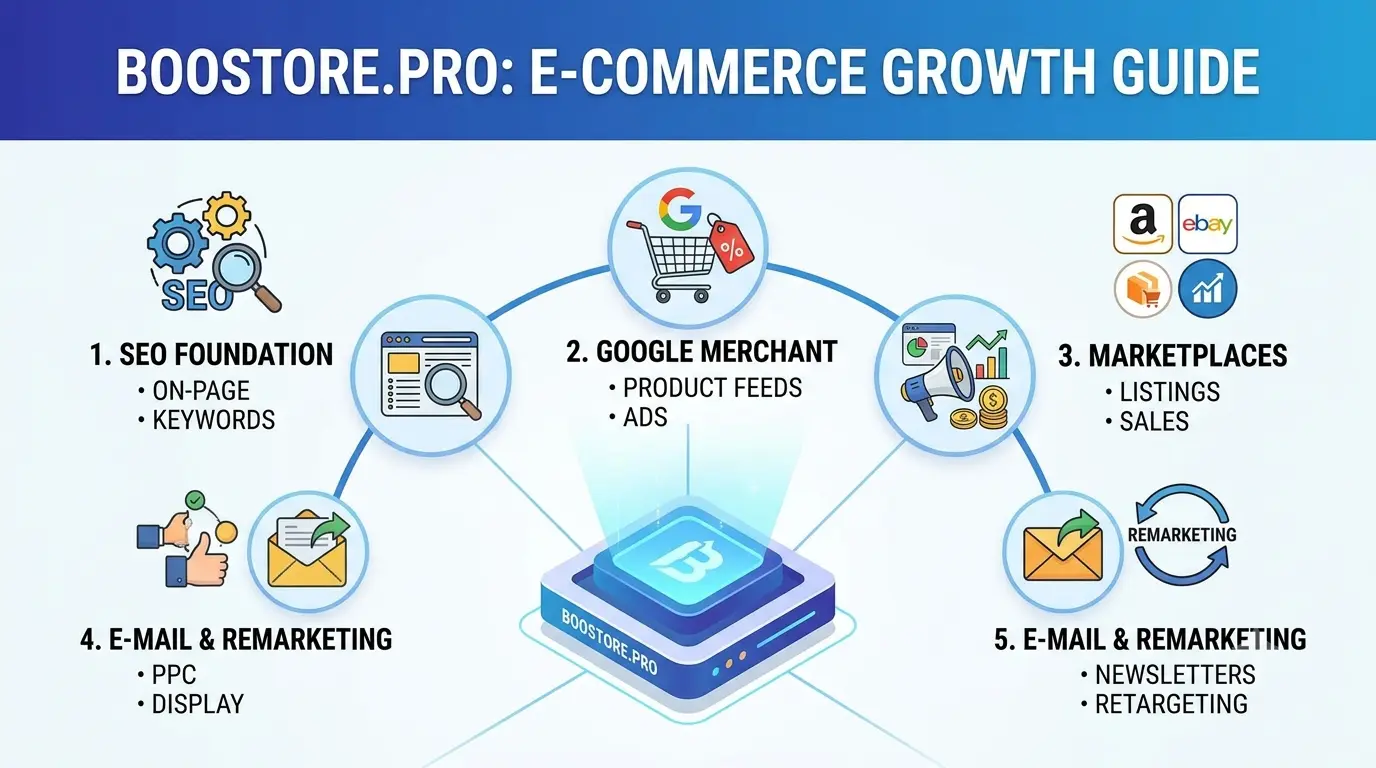
🎯 Online Store Promotion from Scratch: Full Traffic Strategy
You have built a store, but there are no visitors? That is normal at the start — traffic does not appear by itself, it has to be built systematically. In this article we put together a full promotion strategy for an online store from scratch: from the SEO foundation and free channels to Google Merchant and marketplace feeds, paid ads, email and remarketing. All tools — from one BooStore panel, without buying dozens of services.
📄 Table of Contents
- Why a store needs a traffic system, not a single channel
- Traffic channel map for an online store
- SEO foundation: where free traffic begins
- Catalog feeds: Google Merchant, marketplaces and feeds
- Paid advertising: Google Ads and social media
- Email marketing, remarketing and abandoned cart recovery
- Telegram: messenger shop, newsletters and promotions
- YouTube: video reviews, comparisons and shorts
- Analytics and a step-by-step promotion launch plan
- Common promotion mistakes
- Frequently asked questions
🎯 1. Why a store needs a traffic system, not a single channel
The main mistake of a beginner is to put all budget and effort into one source: "I will run Instagram ads and sales will come." The reality of e-commerce is that the conversion of every channel drops over time: algorithms get more expensive, ads burn out, and without SEO there is almost no organic traffic in the first months. A store survives when it has a system of several traffic sources where some channels work for fast sales and others for long-term growth.
⚡ Fast channels
Google Ads, Facebook/Instagram Ads, marketplace feeds — bring sales in the first days but require a budget.
🐢 Long-term channels
SEO, content and blog, email base, remarketing — grow slower but cost less and work for years.
🔄 Synergy
Google Merchant "warms up" the brand, while SEO articles bring the audience that remarketing then converts.
📉 Diversification
If one channel gets more expensive or breaks, the others keep bringing orders. Business risk decreases.
📊 2. Traffic channel map for an online store
Let us break down all visitor sources by stage and budget. This makes it easier to understand what to connect first and what to add later when the base grows.
| Channel | Speed of results | Budget | What it gives |
|---|---|---|---|
| SEO (organic search) | 2–16 months | Large | Stable free traffic from Google |
| Google Shopping / Merchant | 1–3 weeks | Medium / free | Product ads with photo and price |
| Marketplaces (Rozetka, Prom, Hotline) | Days | Fees/subscription | Ready platform audience |
| Google Ads (search) | Days | Medium | Queries with ready demand |
| Social media (FB/IG) | Days | Medium | Reach and brand sales |
| Email marketing | Weeks | Minimal | Repeat sales to the base |
| Remarketing | Days | Low | Returning visitors and abandoned carts |
| Blog / content | 2–6 months | Minimal | Informational queries and trust |
| Telegram (shop and newsletters) | Days | Minimal | Direct sales and repeat purchases from subscribers |
| Video (YouTube: reviews, comparisons, shorts) | 1–6 months | Minimal / blogger budget | Trust and targeted traffic from search and recommendations |
🔍 3. SEO foundation: where free traffic begins
Without a technical base it is useless to buy ads — money leaks into a slow site that Google indexes poorly. The SEO foundation on BooStore is set up from the admin panel and includes everything you need:
⚡ Loading speed
Cache 0.1–0.3 sec, Lazy Loading and optimization give PageSpeed 99–100 out of the box — both UX and a ranking factor.
🔗 SEO-friendly URLs
Human-readable page addresses instead of parameters — better clicks and indexing.
🧩 Schema.org markup
JSON-Schema for products, articles and FAQ — rich snippets in search. See the markup guide.
📝 Smart Meta
Auto-generated titles and descriptions for products and categories plus manual control for key pages.
🗺️ sitemap.xml and robots.txt
The site map and search engine rules are created automatically and updated on changes.
🔒 canonical and 301
Canonical URLs remove duplicates, redirects keep rankings after a move or restructure.
How to build a content strategy for organic traffic — in the article "Why an online store needs a blog".
A complete guide to SEO optimization for an online store — from keywords and meta tags to Schema.org and automation — in the article "SEO for an online store".
📦 4. Catalog feeds: Google Merchant, marketplaces and feeds
Feeds turn your catalog into thousands of "storefronts" on external platforms. One setup — and products automatically get into Google Shopping, Rozetka, Prom, Hotline and Facebook Catalog. BooStore generates feeds in the following formats:
- Google Merchant — product ads in search and on Google Shopping.
- Yandex XML / YML — for the audience searching via Yandex.
- Rozetka.ua, Prom.ua, Hotline.ua — Ukrainian marketplaces with ready buying demand.
- Facebook Catalog — dynamic ads and a shop in social networks.
- JSON / CSV — universal export for any systems and partners.
Feeds are configured flexibly, right from the panel:
🎛️ Segmentation
Export only the needed categories or brands, exclude out-of-stock items.
💹 Markup %
Set your own price for a platform (for example, +7% on Rozetka to cover the fee).
🌐 Currency and language
Conversion to the needed currency and export in 20+ languages for international feeds.
📂 Gzip compression
Light feed files — faster upload to platforms.
💰 5. Paid advertising: Google Ads and social media
When SEO and feeds are set up, add paid channels — they bring fast sales and speed up data collection for analytics. Two main directions:
🔍 Google Ads
Search advertising catches queries with ready demand ("buy Nike sneakers size 42"), while product campaigns (Performance Max) automatically show Google Merchant feeds across all Google surfaces. A launch guide is in the article "Google Ads / Performance Max".
📱 Facebook and Instagram Ads
Social media advertising builds the brand and sells through reach and retargeting. By connecting Facebook Pixel on BooStore, you get e-commerce events (product view, add to cart, purchase) and can target ads at the right audiences.
How to make advertising effective from the start
Set up tracking
Connect Google Analytics with e-commerce events and Facebook Pixel. Without purchase data, ad algorithms "shoot in the dark."
Launch product campaigns
Start with Google Merchant + Performance Max on bestsellers. This is the fastest path to the first paid sales.
Test and scale
Use A/B tests of landing pages on BooStore to increase conversion before scaling the budget. See the article "How to increase sales and performance".
A detailed guide to Google Merchant Center setup and launching Performance Max — in the article "Google Ads / Performance Max".
✉️ 6. Email marketing, remarketing and abandoned cart recovery
Most visitors leave without a purchase the first time — and that is normal. The task of marketing is to catch them and remind them about you. Here two tools built into BooStore work.
✉️ Email base collection
Forms and widgets collect customer contacts right on the site. The base accumulates and works for you for years — it is your asset that does not depend on algorithms.
🛒 Abandoned cart emails
An automatic email a few hours after a customer added a product but did not complete the order. Recovers up to 10–20% of abandoned purchases.
🔁 Dynamic remarketing
Shows the user exactly the products they viewed — in Google and social networks. High conversion because the person already knows the product.
📧 Email newsletters
New arrivals, promotions, back-in-stock letters and series for new subscribers — all through the built-in email module without third-party services. The BooStore platform lets you create newsletters with your own templates and a flexible sending schedule.
✈️ 7. Telegram: messenger shop, newsletters and promotions
One more channel that is often overlooked is Telegram. The messenger stopped being just a "chat" long ago: on BooStore you can build a full shop right inside Telegram with a product catalog, promotions and payments. This is potential traffic that works for direct sales and bringing customers back without an advertising budget.
🛍️ Telegram shop
A product catalog inside the messenger. The customer does the navigation and search through the catalog himself, filters products and chooses the ones to buy. How to build the storefront — in the guide to creating a Telegram shop-catalog. It helps sell where your audience already is.
📢 Telegram newsletters
Automatic messages about new arrivals, availability and discounts instead of email or alongside it. Reach and open rates are higher than email. Guide — in the article on automation of sales and subscribers via Telegram.
🎁 Promotions in the messenger
Publish promotions, promo codes and personal offers to channel subscribers. This is instant contact and an easy way to raise average order value during sales.
🏷️ Promo products right in Telegram
The buyer taps "Special offers" and chooses which products to view: new arrivals, bestsellers, promotional or discounted. You decide what to show in each section and bring forward what should sell — quickly and right in the messenger.
▶️ 8. YouTube: video reviews, comparisons and shorts as a traffic channel
Video content is a separate powerful source: YouTube combines search traffic, reach and trust. Product reviews and comparisons collect views from YouTube and Google search for years, while shorts quickly grow new audiences. Let us look at how to launch and format a store's video promotion.
🎥 Product reviews
Record a video showing the product in use, breaking down pros/cons and specifications. Such videos answer buyers' "what to choose" questions and sell without direct advertising.
⚖️ Comparisons
"Your product vs competitor", "3 models to choose from". Comparisons rank well and push toward purchase by removing a customer's doubts.
📱 Shorts
Short vertical videos up to 60 seconds: unboxing, "1 fact about the product", a quick review. YouTube algorithms show them to a broad audience — an easy entry point for traffic.
🤝 Advertising with bloggers
Paying for mentions from video bloggers in your niche: native reviews and integrations warm up trust and bring targeted viewers to your site. One honest video can sell more than an ad budget.
How to launch and format store videos
Pick a topic based on demand
Build on search queries: "thermos X review", "what is better: A or B". Record what potential buyers actually search for.
Structure: hook → show → conclusion
The first 10 seconds are the intrigue. Then show the product/comparison with facts and figures. Close with a call to action: visit the site, subscribe, comment.
Format the title, thumbnail and description
A clickable thumbnail, an accurate keyword-rich title and a description with a link to the product/category on the BooStore store. This raises CTR and helps video SEO.
Consistency and short versions
Publish 1–2 videos a week and cut long videos into shorts. This builds the channel's trust with algorithms and grows the audience as a steady stream.
📈 9. Analytics and a step-by-step promotion launch plan
Without analytics you will not know which channel pays off. On BooStore you have: sales statistics, Google Analytics with e-commerce events, and data export via API for external systems. Here is a plan to launch promotion from scratch in the first week:
Day 1–2. Set up the SEO foundation
Check SEO-friendly URLs, meta tags, sitemap.xml and robots.txt. Make sure the site loads fast (PageSpeed 90+).
Day 3. Connect analytics
Install Google Analytics (GA4) with e-commerce events and Facebook Pixel. See the GA4 setup guide.
Day 4. Set up feeds
Generate feeds for Google Merchant and at least one marketplace. Send the catalog for moderation.
Day 5. Enable email and remarketing
Set up base collection, an abandoned cart email and remarketing audiences.
Day 6–7. Launch paid advertising
Start with a small budget on bestsellers: Google Performance Max + social retargeting. Analyze and scale.
⚠️ 10. Common promotion mistakes
We collected typical mistakes that kill the budget and time of starting stores:
❓ Frequently asked questions about online store promotion
Answers to the main questions of store owners starting promotion from scratch.
How to start promoting an online store as a beginner?
Start with the SEO foundation: site speed (PageSpeed 90+), SEO-friendly URLs, meta tags, sitemap.xml. Then connect Google Analytics and feeds to Google Merchant and marketplaces. When the first visitors appear, set up email collection and remarketing, then launch paid advertising. This order saves budget and gives sustainable growth.
How many traffic channels does an online store need?
Optimally 4–5 working sources: SEO, Google Merchant/Google Shopping, marketplaces, paid advertising and email + remarketing. Diversification protects against a sudden price increase or shutdown of one channel and creates synergy — for example, an SEO article brings a person and remarketing brings them to a purchase.
What is a Google Merchant feed and why does a store need it?
It is an automatic sending of the product catalog (feed) to Google. Products with photo and price are shown free in Google Shopping and in product ads. On BooStore the feed is generated automatically in Google Merchant, Yandex XML, Rozetka, Prom, Hotline, Facebook Catalog, JSON/CSV formats — with markup, currency and filters.
Paid advertising or SEO — what to choose at the start?
Do not choose — use both. SEO gives free long-term traffic but the first results come in 1–6 months. Paid advertising gives fast sales but requires a budget. The right connection: while SEO gains positions, advertising brings the first customers and analytics data.
How to return buyers who left without a purchase?
With two tools: an automatic abandoned cart email (the customer gets a reminder and returns to payment) and dynamic remarketing (they are shown the viewed products in Google and social networks). Both tools are built into BooStore and work automatically after setup.
What promotion tools does BooStore have?
A full set in one panel: feeds (Google Merchant, Yandex XML, Rozetka, Prom, Hotline, Facebook Catalog, JSON/CSV), SEO (Smart Meta, JSON-Schema, SEO-friendly URLs, sitemap, robots, canonical, 301, PageSpeed 99-100), Google Analytics with e-commerce events, Facebook Pixel, dynamic remarketing, A/B tests, email base collection and abandoned cart emails. No need to buy separate services.
Can you sell directly in Telegram, without a regular website?
Yes. On BooStore you can build a shop-catalog right in Telegram: a storefront with products, cart, payment and order notifications work inside the messenger. In addition, automatic newsletters for subscribers and publishing promotions are available. This is an additional sales channel and potential traffic that connects in a day.
How does YouTube video help promote an online store?
Video reviews, product comparisons and shorts bring targeted traffic from YouTube and Google search, while blogger advertising in the niche scales reach to a warm audience. The videos themselves answer buyers' "what to choose" questions, remove objections and lead people to the store product cards.
Where do you get the first traffic for an online store?
Take the first traffic where buyers already search: free Google Shopping product listings and Facebook Catalog, classifieds boards, marketplace feeds (Rozetka, Prom, Hotline — there is a fee or subscription), your audience on social media and Telegram. While these channels bring the first visitors, you simultaneously build the SEO foundation that will deliver organic traffic later. First sales start to appear within the first weeks.
Can you attract free traffic to an online store?
Yes, and this is the key to starting without a budget. Free traffic comes from: SEO (organic search), free Google Shopping product listings, Facebook Catalog, classifieds boards, blog and content, YouTube videos and shorts, and Telegram and email-base newsletters, social media. These channels require time and effort rather than money — and keep working for years. (Marketplaces like Rozetka, Prom, Hotline are not free: there is a sales fee or subscription.)
How much money do you need for the first online store traffic?
At the start you can manage with almost no budget: enable free Google Shopping and Facebook Catalog exports, add classifieds boards, set up SEO and social media. Be careful with marketplaces — there is a sales fee or subscription. Add paid channels (Google Ads, targeting) in small tests — from $100–300 a month. The rule: free channels and small tests first, then scale what gives a return.
Should an online store run a blog?
Yes, if you want free long-term traffic. A blog answers customers' questions ("how to choose", "what is better"), attracts organic search and builds trust. Regular articles accumulate rankings and work for years. Why a store needs a blog and how to run it is covered in a separate article on BooStore.
Is it important to describe products in detail in an online store?
Very important. Full descriptions and specifications help SEO (match search queries), raise conversion and reduce returns — the buyer knows what they are getting. On BooStore you can quickly fill product cards via import, specifications and auto-descriptions, then improve them manually for strong keywords.
How to increase sales with a proper site structure?
A logical structure shortens the path to purchase and boosts cross-selling: clear menus, categories and filters based on specifications, good product cards with variants (color, size) and related products. Good structure improves both SEO and average order value. How to build it — in the article on BooStore homepage structure.
How to save money on online store promotion?
Do not pay for dozens of services — on BooStore feeds, SEO, analytics, email and remarketing are already included in one plan. Use free channels (Google Shopping, Facebook Catalog, classifieds boards, blog, social media) and test paid advertising with small budgets. Analyze each channel's return and invest only where there is a result.
How much time does the first online store traffic take?
It depends on the channel. Paid channels and marketplaces give results in days. Google Shopping — in 1–3 weeks. SEO, blog and video — from 2 to 6 months, but then they work for years. The right strategy is to combine fast and slow channels: fast ones give the first sales while the "slow" ones gain positions.
How to promote a Telegram channel and add subscribers?
Use three methods: links to the channel in the site header and social media, invitation widgets and buttons on pages and at checkout, plus the storefront itself — a shop and newsletters in Telegram. Useful content, new arrivals and promotions retain subscribers, and convenient in-messenger payment turns them into buyers. More — in the guide to creating a Telegram shop-catalog.
Should an online store use all traffic channels at once?
Not everything at once is required — 4–5 working channels are enough. Start with the SEO foundation, Google Shopping, one marketplace, social media or Telegram and an email base. When these work, add the next one. Measure each channel's return and strengthen the ones that deliver results — this saves more than spreading across everything.
How to find out which traffic channel pays off best?
Connect analytics with e-commerce events (for example, GA4) and calculate the cost per order for each channel: channel spend / number of orders. The channel where this cost is below your acceptable margin is your growth engine. On BooStore the built-in sales statistics, purchase tracking and API export automate this analysis.