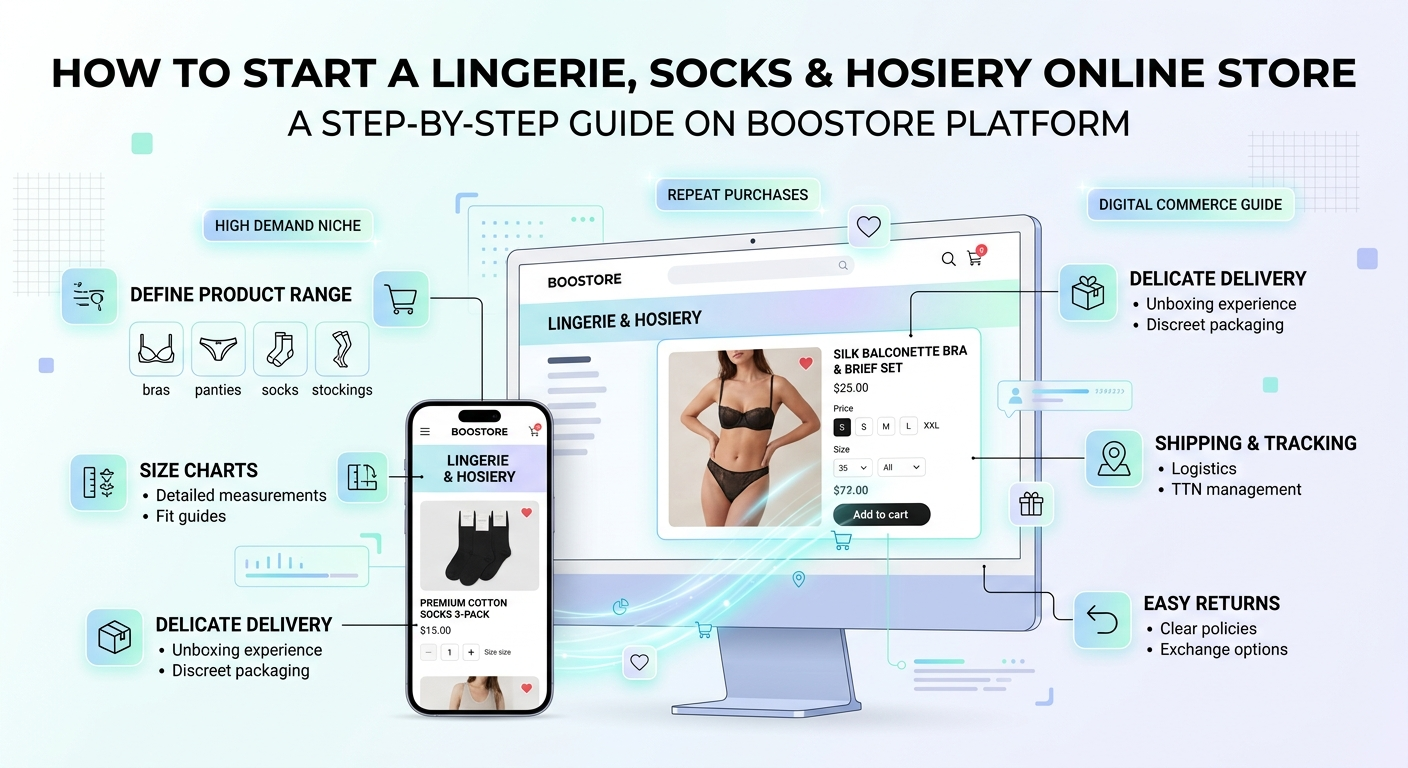
🧦 How to Create an Online Store for Lingerie, Socks and Hosiery
Lingerie and hosiery are a niche with steady demand and frequent repeat purchases: socks and tights are consumables, while lingerie is often bought in sets and as a gift. Here is a step-by-step guide to launching such a store on BooStore — from size charts and variants to discreet delivery, TTN and returns.
📄 Table of contents
- Possible profit and the real benefits of the niche
- Step-by-step plan to create a store
- Template and discreet design
- Catalog structure: categories, brands, collections
- Sizes, cups and the filter — the key to sales
- Live example: choosing colour and size
- Adding products: manually or bulk import
- Automatic import and stock updates
- Order processing and Telegram notifications
- Delivery, TTN, pickup points and returns
- Sales statistics and analytics
- SEO, PageSpeed, Schema.org and site usability
- Free promotion
- API and automation
- Visual editor and block library
- How to start for free
- Mobile menu: how to create and set up
Possible profit and real benefits: why open a lingerie and socks store Business
Before the technical part, let's see why this niche works well online. Lingerie and hosiery are products with steady demand: socks and tights wear out and are bought again, and lingerie is bought in sets, kits and as a gift. Demand is not seasonal, and repeat purchases form a stable order flow.
Situation 1: you already have an offline store
You have products, a warehouse and suppliers. A BooStore site automatically syncs stock by variant: you sold a 75B black set — the stock decreased; a new batch arrived — it was added. Connect a supplier's price list via auto-import and stock updates itself. Plus 24/7 sales and discretion: some customers prefer to order lingerie online rather than in a shop.
Situation 2: dropshipping without a warehouse
A popular scenario for socks and basic lingerie. You find suppliers, upload price lists, set a markup — and sell. Warehousing, packing and shipping are on the supplier. BooStore lets you connect up to 30 sources with different markups and filtering, and orders arrive right in Telegram. No warehouse needed.
Situation 3: starting from scratch
Start with 50–100 items: basic socks, tights, popular lingerie sizes. The site launches for free in a day, and once you see which models and sizes sell best — you scale up and widen the size range.
The technical base is provided by the BooStore platform: a fast start on a template, variants and size charts, product import, auto stock updates, TTN, Telegram notifications and SEO. The full list of features is in the article "Full BooStore SaaS Functionality".
The technical part
Now to practice. Below are concrete steps and settings that turn an idea into a working lingerie and socks store.
Step-by-step plan: how to create a store from scratch Step-by-step
A 9-step scheme takes you from registration to the first order. It is based on the BooStore step-by-step guide and adapted to products with sizes.
Registration and template
Create a site and choose a template focused on large images and a tidy catalog. You can change the template at any time — products and settings are kept.
Categories and product types
Build the structure: men's/women's/kids, then types (bras, panties, sets, socks, tights, stockings, bodysuits). Create product types and features for the filter.
Features and sizes
Add features: size (for lingerie — band + cup, for socks — shoe size or S/M/L), colour, material, composition, set. The filter and size charts are built from them.
Products and variants
Fill in the cards manually or import the catalog. Each size and colour has its own SKU, price, stock and image (see the product section).
Payment and delivery
Connect online payment and delivery services via API, add pickup points. Set the delivery cost and cash on delivery (see the delivery section).
Checkout
Configure the order form: required fields, payment and delivery methods, auto-suggestions of branches and parcel lockers. The customer sees only the needed fields.
Orders and Telegram
Connect the Telegram bot so orders and statuses arrive instantly and managers work fast (see the orders section).
SEO and meta tags
Fill in meta tags, SEO URLs and Schema.org. Start a blog with articles like "How to determine your bra size", "Sock size chart" — it is free search traffic.
Analytics and first sales
Watch statistics by products, sizes and brands, run first promotions and monitor stock of popular sizes (see the analytics section).
Template and discreet store design
In this niche, trust decides a lot. The design should be tidy, calm and "clean": large photos, a soft palette, clear navigation. The customer should not feel awkward about the purchase process — everything maximally neutral and thought through.
- Large images: lingerie and knitwear must be shown in detail — composition, fit, lace;
- Calm palette: neutral tones without loud colours, so attention goes to the product;
- Mobile version: most orders come from a phone — make sure cards and the filter are comfortable on a smartphone;
- Size charts and hints: a visible "How to choose a size" link builds trust and reduces returns;
- Privacy policy and discreet delivery: openly describe the discreet packaging.
You can change the template later without losing products, categories, stock and SEO. Colours, fonts and background are configured in the design editor, and ready sections can be taken from the visual blocks library.
Catalog structure: categories, brands, collections
A clear structure helps the customer find what they need quickly and is good for SEO. For a lingerie and hosiery store, it is logical to split the catalog by gender and product type:
- Women's lingerie: bras, panties, sets, bodysuits, shapewear;
- Men's: briefs, boxers, undershirts, socks;
- Socks and hosiery: ankle, crew, sports, compression, tights, stockings, knee-high;
- Kids: socks, tights, sets;
- Gift sets: boxes, "3 pairs", "lingerie + socks" kits.
Additionally use brands, collections and seasonality (basic and warm items). This speeds up navigation and gives extra entry points for search traffic.
Sizes, cups and the filter — the key to sales Critical
A person cannot try on lingerie or socks online, so they rely on features: size, fit, cup, material, composition, colour. Without a clear filter and size chart the purchase will not happen. BooStore provides a built-in smart search filter configured without third-party services.
Features you must add
📏 Size and cup (for lingerie)
For bras — underbust + cup (70A, 75B, 80C). Add international systems (EU/US/UK) for a foreign audience.
🧤 Sock and tights size
Socks — by shoe size (36–46) or S/M/L; tights — by height and weight. Foot width is a useful extra feature.
🎨 Colour
Multiple choice: the customer wants to see available colours. Each colour has its own variant image.
🎁 Set / kit
A separate feature or variant: "3 pairs", "lingerie + panties", a gift box. Increases the average order value.
🧱 Material and composition
Cotton, bamboo, microfibre, lace, elastane. Composition is critical for allergy sufferers and basic lingerie.
🌞 Seasonality and purpose
Basic, warm, seamless, sports, compression — the filter narrows the choice and speeds up the purchase.
For the chosen combination (“Women · Cotton · Black · 75B”) only matching products are shown. Features that are absent in the opened category can be hidden automatically — the customer sees only relevant filters. This is just an example.
How to create a filter in BooStore (step by step)
- Create a product type — "Shop" → "Product types and features". The name can be generic (for example, "Catalog") or specific — "Panties", "Bra", "Socks". A type is a container of features.
- Add features and values — Gender, Material, Colour, Size, Set, etc. Values are convenient to add in bulk: there is fast import from a text list or pasting JSON straight from the clipboard — the fastest way to create dozens of values.
- One filter for the whole catalog. You can create one product type and one filter for all products and enable the option "hide features not present in the opened category". Then "Socks" will not show cup sizes, and "Bras" will not show shoe sizes. This avoids dozens of extra filters.
- Place the filter in a category. Create a functional menu "Search filter" and specify the ID of the needed product type (chosen from a list). Everything is configured in ordinary pop-ups, without code or complicated settings.
- Set feature values on products — in the product card manually or via import. The filter and product comparison are built from them automatically.
📄 Product comparison
Enable "Comparison" in the filter block settings — and a compare button appears on the cards. The customer compares up to 4 items by size, colour, composition and price in one table. For lingerie and sets this noticeably simplifies the choice.
⚙️ Flexible search-filter setup
The BooStore search filter is configured flexibly — for any catalog and niche:
- Auto path detection.
autopathautomatically decides where to send the search — the open category, business page, collection or producer page. You can force a path (pathurl) or search the whole site (all). - Auto-hide empty parameters.
hideemptyandhideempty_allhide features with no matching products (within the category or without category) — the customer sees only relevant filters. - Auto page update on select.
autosubmitsubmits the form and refreshes the page as soon as any parameter is selected (checkbox, radio or select) — no “Search” button needed. - Counts and subcategories.
countandcount_allshow the number of products;child_catsearches through all nested subcategories.
Everything is configured in the functional menu “Search filter” in a pop-up — parameters are set by checkboxes or typed into the menu block separated by “|”.
👙 Live example: how a customer chooses colour and size Demo
Size and colour are what a customer uses to choose lingerie and socks online, because they cannot try them on. Below is an interactive card example: first the colour is chosen, then the size, while price, SKU and stock update on the fly. This is just an example — in a real store everything is tuned to your assortment.
Bra SoftLace Comfort
SKU: LS-2417 · In stock
First colour, then size — price and stock update automatically. A struck-through size means "out of stock". This is just an example.
That is how variants work: every size and colour is a separate item with its own SKU, price, stock and image. More in the product section.
How to add products: manually or bulk import Filling
There are two ways to fill the catalog — the choice depends on the volume.
Manual adding — for 50–100 items
Good for a start. In the card you fill in: name, price, category, images, description, features and variants (size, colour, set). Convenient for precise control over each card.
Bulk import — for hundreds and thousands of SKUs
When a model has dozens of sizes and colours, manual adding is impossible. BooStore supports import from:
- Excel (CSV / XLS) — you can download the structure by exporting products and use it as a template;
- Google Sheets — live connection by URL, changes sync automatically;
- XML / YML — the standard format of supplier price lists;
- ZIP archives — if the supplier sent an archive with XML/CSV and images.
What can be imported in one upload
📦 Variants
Sizes, cups, colours and sets with unique SKUs, individual prices, stock and images.
📈 Prices and stock
Retail, old, wholesale and purchase price; quantity with increment.
📄 SEO data
Meta Title, Meta Description, SEO URL for each product.
🔍 Features
Linking to a product type and filling feature values for the search filter.
📷 Images
Main and additional photos: provide a URL — the system downloads and converts to WebP.
⚖ Auto-markup on import
Markup is set as a math expression (for example, +10% + 20 + 2%) and applied to the supplier price list.
Automatic import and stock updates
For dropshipping and large catalogs, automation matters. BooStore updates products on a schedule from dozens of sources (CSV/XLS/XML/YML, Google Sheets, FTP/HTTP/HTTPS), supports up to 30 sources with different markup and filtering rules, as well as stock and price updates from suppliers.
- Auto-import on a schedule — the catalog and stock are always up to date;
- Bulk editor — markups, category and availability changes for thousands of SKUs at once;
- Chained markup: sequential operations (percentages, fixed sums) on the site and in exports;
- Loading from 1C/BAS and other accounting systems.
More in the article on bulk price updates and the "Store automation" section.
Fast order processing and Telegram notifications
An order must be processed fast — especially with sizes: the customer does not want to wait. On BooStore orders arrive right in Telegram and in the seller's panel, statuses update automatically, and orders can be managed via the platform's Telegram bot.
- Notifications about new orders and status changes in Telegram;
- Configurable order and payment statuses, returns from statistics;
- Flexible manager rights: one sees only orders, another — products and content, and vice versa;
- Assigning a manager to an order and restricting access to others' orders.
💰 Sales, not just notifications: newsletters and a Telegram shop
Notifications are service, but the same base powers marketing that brings repeat sales — and for socks and basic lingerie that pays off especially well.
- E-mail newsletters — build a subscriber base on the site, announce new arrivals and promos, bring customers back;
- Telegram shop — a catalog showcase right in the bot: the customer picks a product and places an order without the website;
- Telegram broadcasts — announce new stock and sales to subscribers;
- Segmentation and reactivation — abandoned-cart reminders and repeat touches.
More: Telegram sales and subscriber automation and how to create a Telegram shop catalog.
Details in the article "Order management in Telegram / CRM".
Delivery, TTN, pickup points and returns Important
For lingerie and hosiery, delivery is part of trust. Lingerie is compact and light, so the cost is low, but discretion (neutral packaging without contents disclosure) and convenient receiving methods matter. Services connect in a couple of clicks via API: Nova Poshta, Ukrposhta, Meest (in Ukraine and abroad) and Goshippo for international shipments (DHL, UPS, FedEx, USPS).
🧾 What the integration gives
- Auto-suggestions of cities, branches and parcel lockers at checkout;
- Automatic delivery cost calculation using the dimensions and weight from the product card;
- Creating TTN right in the panel, printing waybills and auto-updating statuses by TTN number;
- Configuring order form fields for each delivery method.
🏪 Pickup points and self-pickup
You add your pickup points, and the customer chooses a convenient one at checkout. You set the cost for such cases yourself: self-pickup can be free, while courier can be charged by a fixed sum, percentage, volume or weight.
💰 Your own delivery math and cash on delivery
The delivery cost can be assembled by your own rule: a fixed price, dependence on the order total, volume (m³) or weight (kg), and a combination "fixed sum + percentage". Cash on delivery is supported too — pay on receipt, no prepayment.
On BooStore the set of order form fields is configured per delivery method, and the cost is inserted automatically. This is just an example.
🔄 Returns of lingerie and socks
Lingerie and hosiery are products that cannot be returned after the packaging is opened, so the return terms must be written openly on the store page. Orders, statuses and refund amounts are managed right in the sales statistics, and the return TTN is created in the panel. Describe the size-exchange procedure in advance — it reduces disputes.
The list of services and settings is on the "Delivery services" page.
Sales statistics and analytics
Analytics tells you what to buy and promote. Watch sales by products, sizes, colours, brands and managers, as well as the average order value and repeat purchases.
Full sales funnel. BooStore transmits events for every product and order: product selection, add to cart, the start of checkout and the order itself — together with full data (product, variant, size, colour, quantity, amount). This shows the whole customer path: where they stop and what prevents them from reaching payment. It also works for repeat sales, which is especially important for socks and basic lingerie.
- Which models and sizes sell best;
- Which colours and compositions generate revenue;
- Stock by variant — reorder popular sizes in time;
- Statistics export and order reports.
SEO, PageSpeed, Schema.org and site usability
Organic traffic is the main free channel for such a niche. BooStore provides SEO tools out of the box:
- SEO URLs, meta tags, automatic sitemap.xml;
- Schema.org markup (Product, Offer, FAQPage) — rich snippets in search;
- PageSpeed 99–100 and responsive design;
- A blog for useful articles: "How to choose a bra size", "Sock size chart";
- Export to Google Merchant Center for product ads.
More in the article on improving SEO.
Free promotion
Even with no budget you can get your first customers:
- Blog: articles about sizes, knitwear care, trends — bring search traffic;
- Social media and Telegram: publish new arrivals and sets, run a store channel;
- E-mail and newsletters: collect a base and remind about repeat purchases (socks are a regular item);
- Google Merchant and marketplaces: catalog export widens reach;
- Reviews and UGC: show customer photos — trust is especially important in a discreet niche.
About the blog, read the article "Why an online store needs a blog".
API and automation: full control
For integrations with external systems there is Commerce API v2.0 (Bearer token): managing products, orders, categories, brands and collections, blog and pages. Via the API you can sync stock, export orders to accounting systems and build your own integrations.
- Products and variants, orders, categories, collections;
- Integration with CRM and warehouse systems;
- Automation of routine operations and supplier exchange.
Visual editor, templates and block library
Appearance is configured without code: colours, fonts, background, menu style — in the design editor. And in the visual blocks library there are ready sections: headings, split blocks, benefits, contacts, social media. You just choose a block, set colours and content.
This lets you assemble a tidy and "clean" site for your audience in an evening — without a designer or coder.
How to start for free Start
Launching costs nothing: create a store and fill the catalog up to 1000 products for free and indefinitely — 300 are available right away, and the limit can be expanded free to 1000 for a repost about the platform on social media. Your own domain connects for free, there are no sales commissions — the store and data belong to you.