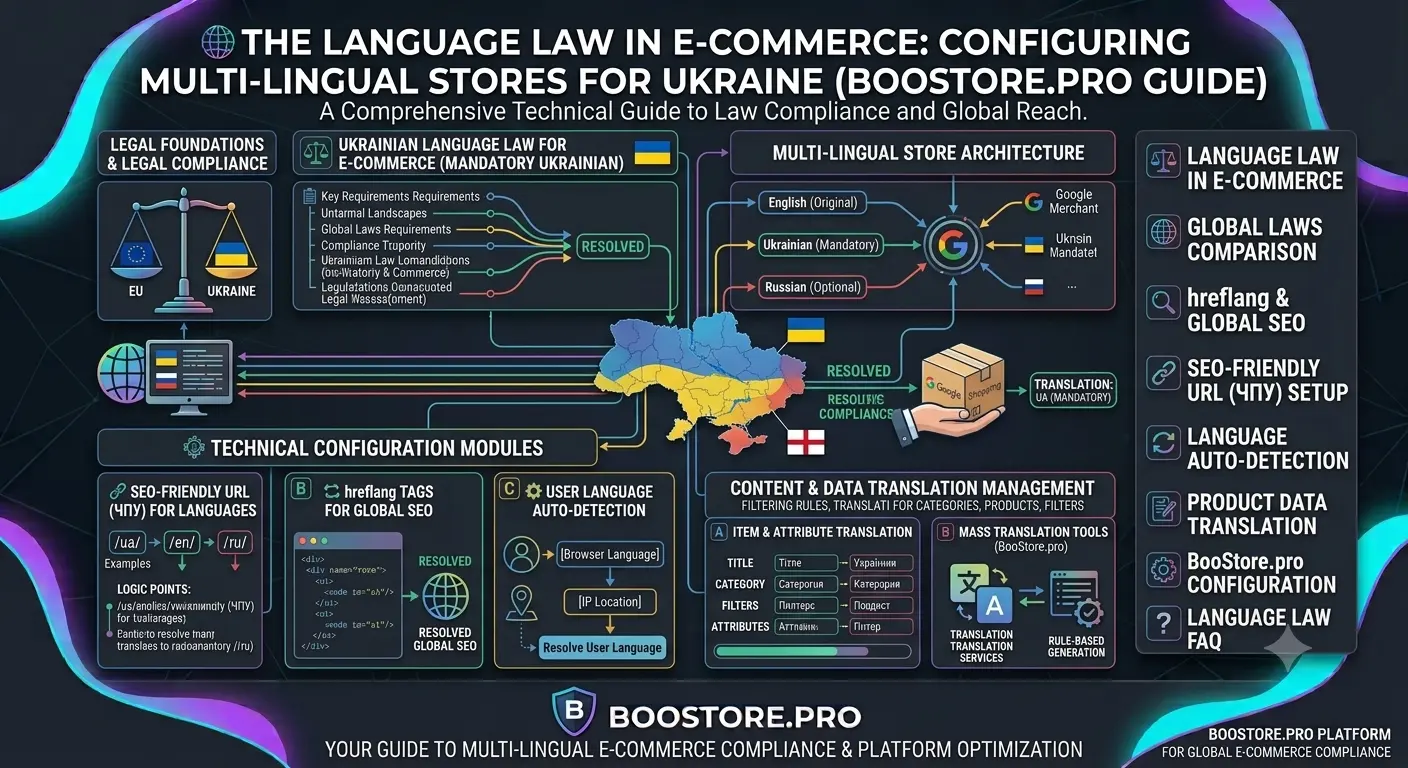
Language Law in E-commerce: How to Set Up Multilingual Online Store According to Ukrainian Rules
Complete guide on setting up a multilingual online store considering the requirements of the Ukrainian language law. We analyze legal requirements, learn to create SEO-friendly URLs for each language version, configure hreflang for SEO, automatically detect user language, and properly translate products, categories, and filters on the BooStore platform.
📄 Table of Contents
- Ukraine's Language Law: What Online Store Owners Need to Know
- Comparing Language Requirements: Ukraine, Poland, EU
- hreflang and SEO: How Search Engines Understand Language Versions
- SEO-friendly URLs for Each Language Version: Proper URL Structure
- Automatic Language Detection and Switching by Browser and Region
- Translating Products, Categories, and Filters Between Languages
- Step-by-Step Multilingual Setup on BooStore
- BooStore vs WordPress/OpenCart: Comparing Approaches
- Frequently Asked Questions
Ukraine's Language Law: What Online Store Owners Need to Know
On January 16, 2021, Ukraine enacted provisions of the Law "On Ensuring the Functioning of the Ukrainian Language as the State Language" that directly regulate online stores and e-commerce. According to Article 30 of the Law, the language of interfaces and user web resources for goods and services, including online stores, is the state language — Ukrainian.
This means that online store owners are required to provide information in the Ukrainian language: product descriptions, specifications, prices, delivery and payment terms, contact information. At the same time, the law does not prohibit having other language versions — Russian, English, Polish. The main requirement: the Ukrainian version must be complete and not inferior in information volume to other language versions.
Violating the law carries penalties: a fine of 200 to 400 tax-free minimum incomes (from 3,400 to 6,800 UAH) for officials, and repeated violation — up to 8,500 UAH. Therefore, proper multilingual configuration is not just a matter of convenience but a legal requirement for operating in the Ukrainian market.
For information on how to open an online store in Ukraine considering all legal requirements, read the article: How to Open an Online Store in Ukraine: Complete Guide 2026.
Comparing Language Requirements: Ukraine, Poland, EU
Language regulation of e-commerce varies significantly across countries. Understanding these differences is important if your store operates in multiple markets. Let's examine the requirements of three key regions for Ukrainian entrepreneurs.
| Parameter | Ukraine | Poland | European Union |
|---|---|---|---|
| Mandatory interface language | Ukrainian (state language) | Polish (consumer rights) | Language of EU member state |
| Other languages allowed | Allowed, but Ukrainian version cannot be trimmed | Allowed, contracts in Polish mandatory | Freely, English recommended |
| Legal framework | Law No. 2704-VIII Art. 30 | Ustawa o prawach konsumenta | Directive 2011/83/EU |
| Penalties for violation | up to 8,500 UAH | up to 100,000 PLN | depends on country |
| URL requirements | Recommended /ua/, /ru/, /en/ | /pl/, /en/ | Recommended /en/, /de/, /fr/ |
| hreflang mandatory | Recommended for SEO | Recommended for SEO | Recommended for SEO |
| Auto language detection | Allowed, with choice option | Allowed | Allowed |
The peculiarity of Ukrainian legislation is the strict requirement for the state language as the primary one. In Poland, it is sufficient to translate contracts and key consumer rights information into Polish. In the EU, requirements vary by country, but the general trend is mandatory use of the official language of the member state for legally significant information.
More about the Ukrainian e-commerce market specifics and choosing a platform: Ukrainian Shopify Alternatives: Comparing E-commerce Platforms.
hreflang and SEO: How Search Engines Understand Language Versions
When an online store has multiple language versions, search engines need to know which version to show to a user based on their language and region. This is achieved using the hreflang attribute — an HTML tag that tells Google and other search engines about the relationship between pages in different languages.
Proper hreflang implementation includes:
- Mutual links — each language version must link to all other versions of the same page
- rel="alternate" attribute with language code (e.g., hreflang="uk", hreflang="ru", hreflang="en")
- x-default — default version for languages not in the list
- Unique URLs — different addresses for different languages (not fragments or parameters)
On the BooStore platform, hreflang tags are generated automatically. Simply specify the same identifier (e.g., the ID of the first created product) in the "Page in other languages / Product in other languages" field of the product, page, or article card. The system will automatically add correct hreflang tags to all linked pages, including x-default for the site's main language.
Example of correct hreflang markup for three language versions:
<link rel="alternate" hreflang="uk" href="https://site.com.ua/ua/product/kedy" />
<link rel="alternate" hreflang="ru" href="https://site.com.ua/ru/product/kedy" />
<link rel="alternate" hreflang="en" href="https://site.com.ua/en/product/kedy" />
<link rel="alternate" hreflang="x-default" href="https://site.com.ua/ua/product/kedy" />
More about SEO optimization for online stores: How to Improve Online Store SEO: Complete Guide.
SEO-friendly URLs for Each Language Version: Proper URL Structure
For successful promotion of a multilingual online store, it is critical to use unique URLs for each language version. Google recommends three approaches, and the BooStore platform supports the most correct one — language prefix in the URL.
Recommended URL structure:
/ua/category/tovar— Ukrainian version/ru/category/tovar— Russian version/en/category/tovar— English version/pl/category/tovar— Polish version
✅ Language Prefix (Recommended)
/ua/product, /ru/product
Supported by BooStore. Easy setup, clear structure, properly indexed by search engines.
❌ Subdomains
ua.site.com, ru.site.com
Requires separate domains/subdomains. Harder to set up, link equity distributed among subdomains.
❌ GET Parameters
/product?lang=ua
Not recommended by Google. Risk of duplicate content, indexing difficulties.
✅ Separate Domains
site.com.ua, site.ru
Maximum SEO isolation, but requires purchasing and configuring multiple domains.
On BooStore, the language prefix is added automatically. For example, if you create a page or product in Ukrainian, the URL will be /ua/..., in Russian — /ru/.... For store categories, it is recommended to use language suffixes in the category name, e.g.: category_ua, category_ru, category_en. This allows the platform to correctly determine the category language and avoid errors when importing products.
Automatic Language Detection and Switching by Browser and Region
A modern multilingual online store should automatically detect the user's preferred language and offer the appropriate site version. This increases conversion and improves user experience.
Language detection mechanisms:
- HTTP Accept-Language header — the user's browser sends information about preferred languages. The server can redirect to the appropriate version.
- IP geolocation — determining country by IP address. For example, a user from Poland automatically sees the Polish version.
- Cookie/session — after the first language selection, we remember the user's preference.
- localStorage — language is stored in the browser and applied on subsequent visits.
On BooStore, automatic language detection and switching are implemented through a built-in language menu mechanism. You can place a language switcher code on the site that uses hotengine-script-language.js to substitute the correct URLs from link[rel="alternate"] tags. All major languages are supported: Ukrainian, Russian, English, Polish, German, French, and others.
Example language switcher code for BooStore:
<nav class="hotengine-shop-select-language-box">
  <span class="hotengine-shop-select-language" data-lang="ua"></span>
  <span class="hotengine-shop-select-language-values">
    <li><a class="hotengine-shop-select-language-val" data-lang="ua" href="/ua/"></a></li>
    <li><a class="hotengine-shop-select-language-val" data-lang="ru" href="/ru/"></a></li>
    <li><a class="hotengine-shop-select-language-val" data-lang="en" href="/en/"></a></li>
    <li><a class="hotengine-shop-select-language-val" data-lang="pl" href="/pl/"></a></li>
  </span>
</nav>
CSS styles for displaying flags via pseudo-elements and the script for substituting paths are connected once and work for all languages automatically.
Translating Products, Categories, and Filters Between Languages
The most time-consuming stage of creating a multilingual store is content translation. The BooStore platform provides several approaches to speed up this process.
Translating products via CSV/XLSX import/export
The fastest way for stores with a large assortment:
- Export products in the "Store" — "Export products" section (export all fields, including categories).
- Translate the file using Google Translate for documents (save as XLSX).
- Add language suffixes to categories (e.g.,
dress_ua→dress_en). - Copy product IDs to the "Products in other languages" column, remove IDs from the ID column, change "Product code" (add
_ensuffix). - Import the file — new products will be created in the other language.
Translating categories
Categories can also be exported, translated, and imported back. Each category has a language specified. It is recommended to use unique category names with language suffixes: category_ua, category_ru, category_en. This eliminates errors during subsequent product imports.
Translating search filters
Filters (product attributes) can be translated in two ways:
- Through the "Translate attribute values" tool — in the admin panel, in the attribute management section.
- Through JavaScript — by placing a script on pages with the filter, you can replace value text with the desired language. This is convenient if you use one filter for all language versions.
Price and stock synchronization
An important feature of BooStore: if products are linked via the "Product in other languages" field, when the price, availability, "new" or "bestseller" status changes in one product — all linked products in other languages update automatically. This eliminates data discrepancies between language versions.
Step-by-Step Multilingual Setup on BooStore
This section provides a concrete step-by-step plan for setting up a multilingual online store on the BooStore platform from start to finish.
Set the main site language
In the admin panel, go to "Settings" → "Languages and start page". Set the main language to Ukrainian (uk). This will ensure correct hreflang operation with the x-default attribute and determine the language for all elements by default. More in the documentation.
Create categories with language suffixes
In the "Store" — "Store categories" section, create categories for each language using suffixes: odezhda_ua, odezhda_ru, odezhda_en. Specify the appropriate language for each category. In the "Category in other languages" field, enter the IDs of related categories. This will automatically link categories across different languages.
Configure language blocks (header, menu, footer)
Create "Blocks/Menus" for each language. For example: "Header-UA", "Header-RU", "Header-EN". For each block, specify the language in which it should be displayed. If an element is the same for all languages (e.g., analytics code), specify the language "All".
Add a language switcher
Add the language dropdown code to the appropriate place on the site (header or footer). Connect hotengine-script-language.js for automatic URL substitution from hreflang tags. Configure CSS styles for displaying language names: UA, RU, EN, PL.
Create pages in different languages
Create a page in Ukrainian, then the same page in Russian and English. In the "Page in other languages" field, specify the same value (ID of the first page). The platform will automatically generate hreflang tags on all related pages. The main page will correspond to the site's primary language.
Import products in other languages
Export products, translate via Google Translate, copy IDs to "Products in other languages", replace product codes and import. Check that the "Product in other languages" field is filled for all products in the main language — this ensures correct cross-linking and hreflang.
Check hreflang and indexing
Open the page in each language and check the source code — link rel="alternate" tags with hreflang should be present for all versions. Use Google Search Console → "URL Inspection" for each language version. Make sure Google sees and indexes all versions.
Configure XML feeds for each language
If you use Google Merchant Center or Facebook Catalog, create separate feeds for each language version. BooStore generates XML exports automatically; use the appropriate URLs with language prefix for each feed.
More about structured data and micro-markup for online stores: Schema.org Product Markup Guide for E-commerce.
BooStore vs WordPress/OpenCart: Comparing Approaches to Multilingual Setup
There are several popular solutions for creating a multilingual online store on the market. Let's compare the BooStore (SaaS platform) approach with classic CMS — WordPress + WooCommerce and OpenCart.
| Parameter | BooStore | WordPress + WooCommerce | OpenCart |
|---|---|---|---|
| Platform type | SaaS (all-inclusive) | CMS + plugins | CMS + extensions |
| Multilingual out of the box | Yes | Requires plugin (WPML, Polylang) | Requires extension |
| Setup complexity | Low — visual editor | High — plugins, conflicts | Medium — language mods |
| hreflang automatically | Yes | Only in paid plugins | Only in extensions |
| SEO-friendly URLs with language prefix | Yes | Via plugin | Via extension |
| Product translation | Via CSV/XLSX import | Manually or by plugin | Via CSV or module |
| Filter translation | JS translation or tool | Difficult, depends on plugin | Difficult |
| Price synchronization | Automatic | Manual | Manual |
| Updates and security | Automatic (SaaS) | Manual, compatibility risk | Manual |
| Cost of multilingual features | Included in plan | $100–300/year for WPML | From $30 per extension |
❓ Frequently Asked Questions About Multilingual Online Stores
Answers to the most common questions when setting up a multilingual online store considering Ukraine's language law.
Can I add more than three languages on BooStore?
Yes, the platform supports many languages: Ukrainian, Russian, English, Polish, German, French, Spanish, Italian, Kazakh, Belarusian, Romanian, Turkish, Slovak, Danish, Chinese, Hindi, Arabic, Portuguese, Bengali, and others. Separate pages, products, categories, and blocks are created for each language.
How to check if hreflang is set up correctly?
Use Google tools: "URL Inspection" in Google Search Console shows which hreflang tags are detected. You can also use the Chrome extension "Hreflang Tag Checker" or the Merkle Hreflang Tester service. Open the page, view the source code — tags <link rel="alternate" hreflang="..." href="..." /> should be present for each language version.
Do I need to pay extra for multilingual features on BooStore?
No, the multilingual feature is included in all BooStore plans. You can create an unlimited number of language versions at no extra cost. The only expense is time for content translation. Unlike WordPress where WPML costs from $100/year, on BooStore multilingual functionality is available immediately.
What if there is no Ukrainian version of a product but a Russian one exists?
From the language law perspective, this is a violation — the Ukrainian version must be complete. It is recommended to first create Ukrainian versions of all products (at least with basic descriptions and attributes), then add other languages. If a product is temporarily unavailable in Ukrainian, it's better to hide it in other languages or use automatic translation as a temporary solution.
How to translate an existing BooStore store into another language?
Use bulk export/import via CSV/XLSX. Export products and categories, translate via Google Translate for documents, replace product codes (adding a language suffix), copy product IDs to the "Products in other languages" field, and import. For pages, create new versions manually, specifying the original page ID in the "Page in other languages" field.
Does multilingual support affect site loading speed?
On BooStore, multilingual support does not affect loading speed because only the current language's content is loaded. Search filters and blocks configured for all languages work without performance loss. This is an advantage over WPML plugins, which can slow down a site due to additional SQL queries. BooStore uses caching for all language versions.