Areas of Application: Who Needs a Booking Module and Why?
The online appointment module from BooStore.pro is a universal automation tool that relieves businesses of "manual" schedule management, eliminates errors, and allows customers to book services 24/7.
Services and Specialists
Perfect for booking doctors, beauty salons, fitness centers, or private legal and business consultations.
Resource Rental
Management of table reservations in restaurants, massage chairs, office rooms, or rooms in small hotels.
Transport and Rental
Organization of car, bicycle, and scooter rentals or specialized construction equipment with return time control.
Events and Groups
Selling spots for masterclasses, group tours, webinars, or registration for sporting events.
Flexibility and the "Available/Busy" Logic
The main problem with most booking systems is their isolation. In BooStore.pro, the appointment module is an integral part of the sales statistics "organism." This means that every booking is a real order, and every time slot represents the real-time status of that order.
🤖 Automatic Slot Control
The system understands availability not just by the presence of a record, but by the order status in your admin panel. As soon as a customer selects a time and confirms the form, an order is created.
While the order is in the Processing or Paid statuses, the system blocks this time for other users. You don't need to manually "close" dates — the algorithm does it instantly.
👥 Group Bookings (Multiply): One Slot — Multiple Spots
What if you have not one massage therapist, but three? Or you are selling 10 tickets for a single masterclass? This is where the data-booking-slot-allow-multiply parameter comes into play.
⚡ Why Admin Cancellation is Magic for the Website
The flexibility of BooStore.pro shines during moments of change. Imagine the situation: a client calls and cancels an appointment. You go into the sales statistics and change the order status to Canceled.
This connection works both ways: you can manually create an order in the admin panel for a specific time (e.g., a phone booking), and the website will immediately "know" that this time is now occupied.
This architecture eliminates the "human factor" and the risk of overbooking (double bookings) by 100%.
Smart Time Management
⏲️ Flexible Time Slots
You decide how to divide the workday. The data-booking-slot-booking-time parameter allows you to set the step in seconds. Want bookings for quick 15-minute consultations? Set it to 900. Need to rent a hall for 3 hours? Set it to 10800.
🛡️ Dynamic Limits and "Surprise" Protection
The system allows you to configure the planning horizon to suit your staff's convenience.
- Minimum Threshold: Restrict bookings to "no earlier than X hours." This saves you from situations where a client books "for right now" before you are ready.
- Maximum Limit: Specify endofmonth or a specific date so that clients don't book resources a year in advance.
- Date Offset: Ability to book with an offset (start today — end tomorrow).
🎨 Buffer Zones for Perfect UI
To prevent the interface from looking "empty," use the data-booking-time-show-empty parameter. It allows displaying inactive time intervals before the available time starts. This creates visual order and shows the client the full grid of your workday, even if the morning is already booked or unavailable.
4. Pricing and Monetization
💰 Dynamic Cost Calculation
BooStore.pro can do the math for you. If you have a base price for 1 hour and a client selects 3 hours in the selector — the system will automatically apply the coefficient.
If duration should not affect the cost (e.g., a fixed ticket for a quest room), simply activate the data-booking-slot-fixed-price parameter.
💳 Instant Payment Acceptance
For businesses where a "show-up" guarantee is vital, the data-booking-payment-required function is provided.
As soon as the user clicks "Book," the system doesn't just create an order; it instantly redirects them to the chosen payment gateway. The booking is confirmed only after a successful transaction, reducing "no-show" rates to zero.
Quick Start: Turn Any Button into a Booking System
The uniqueness of the BooStore.pro platform is that you don't need to change your website structure. Simply connect the script and add the required attributes to any HTML element (button, link, or block) to activate a professional booking widget.
Add these lines to the section or before the closing tag:
rel="stylesheet" type="text/css" href="/templates/styles/booking/css_hotengine_booking.css" />
Step 2: Create a Booking Button
It is enough to create a container with the data-booking attribute and place a button with the booking-slot-start-order class inside it.
Full Parameter Reference (Data-attributes)
days:+X,hours:+Y.
Available:
month, weeks, days, hours.endofmonth, endofnextmonth, endofyear, endofnextyear.0 — off, 1 — all, 2 — after minimum.12 — AM/PM format.🚀 Full Flexibility for Any Business Process
The combination of these parameters allows you to configure everything: from a simple appointment at a beauty salon to a complex equipment rental system with daily rates and automatic status updates. Your imagination is the only limit.
Open full integration guideThe script automatically manages the state of elements. When a slot is busy, it is assigned the attribute data-booking-status="busy". You can set any CSS style for such elements to visually distinguish them for the user.
[data-booking-status="busy"] { opacity: 0.5; pointer-events: none; filter: grayscale(1); }
Below is a ready-made code snippet for creating a booking button for Group №1 with a one-hour interval and automatic price calculation:
booking-slot" data-booking data-booking-slot-group-id="1" data-booking-slot-group-title="Title" data-booking-slot-booking-time="3600" data-booking-slot-booking-time-allowchange="true" data-booking-time-show-empty="1" data-booking-slot-max-booking-time="10800" data-booking-slot-max-booking-time-show-selector="true" data-booking-slot-min-calendar-date-form-now="" data-booking-slot-max-calendar-date-form-now="endofnextmonth" data-booking-slot-max-calendar-date="" data-booking-slot-allow-multiply="0" data-booking-slot-days-extended="0" data-booking-slot-allow-preorder="0" data-booking-form-id="YOUR_FORM_ID" data-booking-slot-price="10USD" data-booking-slot-fixed-price="false" data-booking-payment-required="false" data-booking-status-after="0" data-booking-status-after-payment="1" data-booking-slot-time-format="24" data-booking-window-title="Booking">display:block; margin:15px auto; font-size:140%;">Group 1booking-slot-status-block"> booking-slot-start-order">
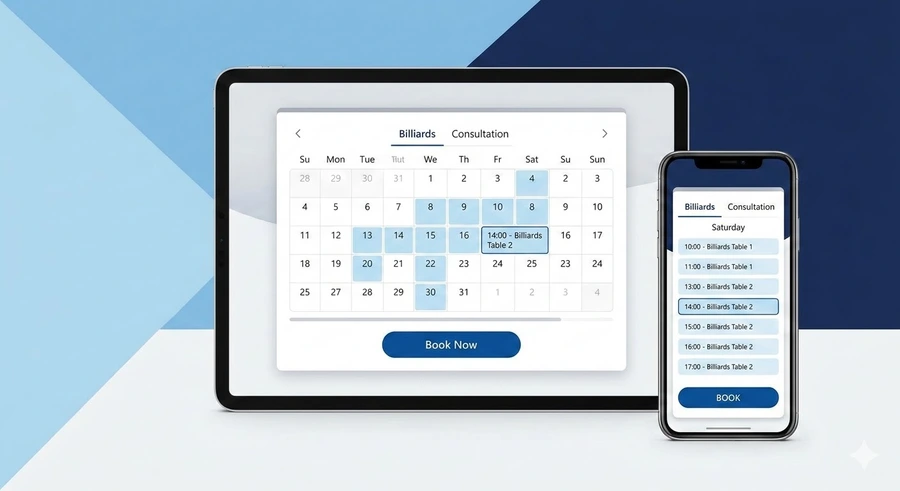
See how the module works on a real project. A booking system for a billiard club using individual groups for tables and advanced payment logic.
For deep integration and tracking every user step, use the callback_hotengine_booking_form($a) function. It allows you to inject your scripts (analytics, data validation, notifications) at any stage of the booking process.
console.log('Current booking stage:', step);
if (step === 10) { /* Your code on confirmation */ }
}
| ID ($a) | Event Description |
|---|---|
| 2 | Before requesting the list of available slots |
| 3 | Available slots list is formed and displayed |
| 4 | User clicked "Back" / Show slots from a specified date |
| 6 | Confirmation process starts (specific slot selection) |
| 7 | Before sending booking confirmation |
| 8 | Final data list generation before sending |
| 9 | Moment before the direct submission of the selected slot |
| 10 | Submission of the booking confirmation form (Action) |
| 1 | Final result (successful submission or error) |
Management and Analytics: Full Control Over Bookings
The BooStore.pro booking module is not just a widget on a website, but a full-fledged CRM system. All booking data is instantly synchronized with your control panel, providing detailed reporting and tools for customer relations.
📊 Detailed Sales Statistics
- Customer Data: Full information from the form (name, phone, email, additional fields).
- Slot Detailing: Clear indication of selected dates and time intervals.
- Transparent Pricing: Each order shows the base price per hour, the applied coefficient, and the total cost.
- Status Management: Change statuses ("Processing," "Confirmed," "Canceled") directly in the sales table.
📅 Administrative Calendar
- Visual Overview: A visual grid of all occupied and free slots for the day, week, or month.
- Instant Info: Clicking an occupied slot opens a card with customer data and payment status.
- Payment Control: Visual markers for paid and unpaid bookings.
- Flexible Editing: Ability to promptly manage each specific slot through the administrative interface.
💡 Why Is This Important for Business?
You don't just receive an order notification; you see the entire economics of the process. The system automatically calculates revenue based on booking duration and allows administrators to work within a single visual calendar field, eliminating the risk of overlaps or double bookings.
🔌 Managing Bookings via Commerce API
All booking module data is available for integration via the Commerce API. You can programmatically manage slots, create and update orders with bookings, and retrieve calendar data — for synchronization with external CRMs, mobile applications, or custom dashboards.
Booking API section on your account's Commerce API documentation page.
❓ Frequently Asked Questions About Booking
Answers to the most common questions about configuring and using the BooStore.pro online booking module
Is the booking function available on BooStore?
Yes, a comprehensive online scheduling and booking module is available on the BooStore.pro platform. It features an interactive calendar for time slot management, a flexible status tracking system to monitor order fulfillment stages, and integrated online payment processing upon booking submission. Furthermore, the module fully supports the Commerce API, enabling remote management, seamless data synchronization with external systems, and workflow automation.
Can I use the booking module on the free plan?
Yes. The booking module is available on all plans, including the free one. You can create an unlimited number of slot groups (resources) and accept orders via the widget. The free plan has standard limits on the number of products and orders per month, but the booking functionality itself is not locked.
How do I set up a mandatory prepayment for bookings?
Use the data-booking-payment-required="1" attribute. After selecting a time and submitting the form, the client will be automatically redirected to the payment gateway. The order status will change to "Paid" only after a successful transaction, and the slot will become occupied. Additionally, configure data-booking-status-after-payment to automatically change the status after payment.
How do I set up group booking (multiple spots for a single slot)?
Add the data-booking-slot-allow-multiply="N" attribute, where N is the number of available spots. For example, for a masterclass for 10 people, specify a value of 10. The system will show the slot as available until the number of confirmed orders reaches the limit. Each new order decreases the counter of available spots.
Why does a slot on the website remain occupied after an order is canceled?
Check the data-booking-slot-allow-preorder setting. If the value is 0 (default), the slot is considered occupied as long as the order has a "Pending" status. When an order is canceled ("Canceled" status), the slot is released. If the problem persists, ensure that the order status has actually changed to canceled (2, 5, or 6) and not to "Processing".
Can I synchronize bookings with Google Calendar or Outlook?
There is no direct synchronization with external calendars out of the box. However, you can use the Commerce API to programmatically export booking data and set up an integration via third-party services (Zapier, Make) or your own script. All calendar data (dates, times, statuses) is available via GET /api/commerce/orders with the booking and booking_data fields.
How do I limit the booking depth (no further than a month from now)?
Use the data-booking-slot-max-calendar-date-form-now attribute. To limit bookings to one month, specify the value endofnextmonth. The constants endofmonth, endofyear, endofnextyear or an absolute date in data-booking-slot-max-calendar-date are also available.
Does the module work on phones and tablets?
Yes. The booking widget is fully responsive. The calendar and time selection interface displays correctly on all devices, including smartphones with a screen width starting from 320px. Separate styles and simplified navigation are provided for mobile devices.
How do I change the price depending on the booking duration?
Specify the base price per time step in the data-booking-slot-price="10USD" attribute, where 10USD is the price for one base interval (the step is defined in data-booking-slot-booking-time). The system will automatically multiply the base price by the number of selected intervals. If the price is fixed and should not change based on duration, add data-booking-slot-fixed-price="1".
Can I export booking data to Excel or a CRM?
Yes. All orders, including bookings, are available in the standard sales statistics table in the admin panel. You can export data to CSV/XLS. For automatic exporting, use the Commerce API: GET /api/commerce/orders filtered by date. The response includes all order fields, including booking and booking_data with detailed slot information.
What happens if two clients select the same time simultaneously?
The system locks the slot at the database level at the moment of order confirmation. If two users click "Book" simultaneously, the first request will create the order and lock the time slot, while the second user will receive an error stating that the slot is already taken. Double bookings (overbooking) are prevented at the architecture level.
✅ Everything is ready for launch!
Use a combination of data attributes for logic, CSS for styling occupied slots, and Callback functions for full control over system behavior. BooStore.pro provides full functionality for creating a booking site for any services. Statuses, online payments, and total control.